Supabase RLS for AI-built apps: prove users cannot read each other's data
Build RLS policies for a notes app and test with two accounts that users cannot read or insert each other's data. Reproducible SQL and script.
Başlıklar
Imagine an AI-built notes app. Alice saves a product idea; Bob signs in with his own account. A frontend filter on owner_id makes the screen look private, but a direct API request could still ask for Alice’s note. The separation has to happen in the database. In Supabase, Row Level Security (RLS) combines table privileges with policies that decide which rows each user may access.
This guide creates a test table and checks two boundaries: Bob cannot read Alice’s note, and he cannot insert a note that claims to belong to Alice. The SQL follows Supabase’s official RLS documentation. I checked the JavaScript test file with node --check, but I did not run the SQL or the test against a Supabase project because no disposable instance is available here. Run it in a test project first; adapt the rules to your real data model and operations before production.
The rule behind a private row
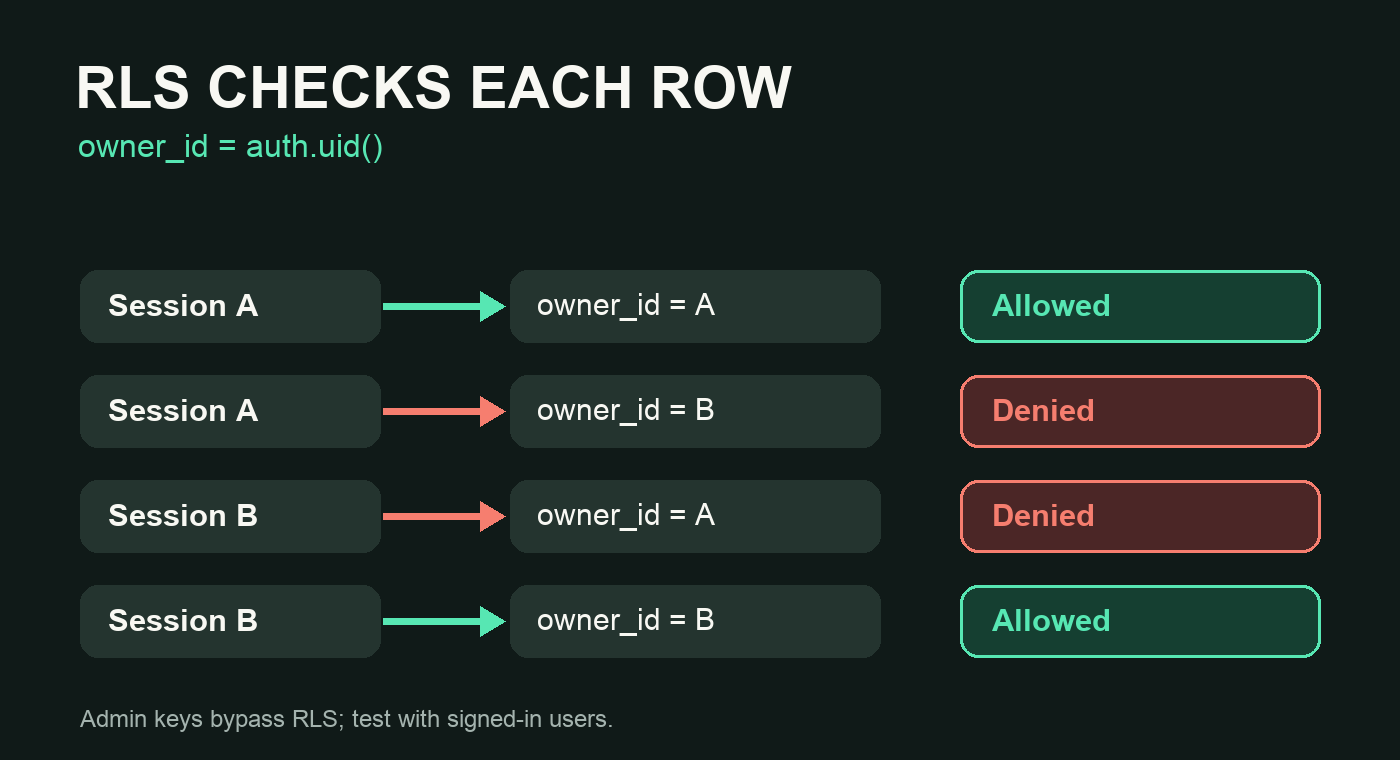
Supabase describes two gates. GRANT decides whether a role may call SELECT, INSERT, UPDATE, or DELETE; RLS decides which rows pass that operation. Merely switching RLS on without reviewing grants leaves a confusing permission model. This example gives anon no table privileges. authenticated gets only the four operations the app needs. Each policy checks that owner_id equals (select auth.uid()), the current signed-in user’s ID.
In the diagram, account A can access its rows. Account B reaches the same table, but the policy filters A’s rows before returning anything to B.
1. Create the table and policies
In the SQL Editor of a disposable project, run this block to create private_notes. If a table with that name already exists, do not run the block over it; adapt the SQL as a reviewed migration. The index on owner_id helps as the table grows because every policy filters on that column.
-- Run in a disposable Supabase project before adapting to a production table.
create table public.private_notes (
  id uuid primary key default gen_random_uuid(),
  owner_id uuid not null references auth.users(id) on delete cascade,
  body text not null
);

create index private_notes_owner_id_idx on public.private_notes(owner_id);
alter table public.private_notes enable row level security;

revoke all on table public.private_notes from anon, authenticated;
grant select, insert, update, delete on table public.private_notes to authenticated;

create policy "read own notes" on public.private_notes
  for select to authenticated
  using ((select auth.uid()) = owner_id);

create policy "create own notes" on public.private_notes
  for insert to authenticated
  with check ((select auth.uid()) = owner_id);

create policy "update own notes" on public.private_notes
  for update to authenticated
  using ((select auth.uid()) = owner_id)
  with check ((select auth.uid()) = owner_id);

create policy "delete own notes" on public.private_notes
  for delete to authenticated
  using ((select auth.uid()) = owner_id);
The SELECT policy returns only owned rows. INSERT uses WITH CHECK so Bob cannot save a row with Alice’s owner_id. UPDATE checks both the existing row and the resulting row, preventing ownership reassignment. DELETE permits removal of owned rows only. Supabase documents the operation-specific policies and supabase test db.
2. Use two real sessions, not an admin key
Create two confirmed test users in Supabase Auth. The script below uses two independent clients and the project’s publishable key. Do not use a secret key or service_role: Supabase says that role bypasses RLS and would give you a misleading pass. In a temporary directory install @supabase/supabase-js, save the code as test_private_notes_rls.mjs, and set SUPABASE_URL, SUPABASE_PUBLISHABLE_KEY, USER_A_EMAIL, USER_A_PASSWORD, USER_B_EMAIL, and USER_B_PASSWORD in your local environment. Keep those credentials out of Git.
import { createClient } from '@supabase/supabase-js'

const url = process.env.SUPABASE_URL
const key = process.env.SUPABASE_PUBLISHABLE_KEY
if (!url || !key) throw new Error('Missing Supabase URL or publishable key')

const client = () => createClient(url, key, {
  auth: { persistSession: false, autoRefreshToken: false },
})
const a = client()
const b = client()

async function login(client, email, password) {
  const { data, error } = await client.auth.signInWithPassword({ email, password })
  if (error) throw error
  return data.user.id
}

const aId = await login(a, process.env.USER_A_EMAIL, process.env.USER_A_PASSWORD)
const bId = await login(b, process.env.USER_B_EMAIL, process.env.USER_B_PASSWORD)
if (aId === bId) throw new Error('Use two different test users')

const { data: note, error: insertError } = await a
  .from('private_notes').insert({ owner_id: aId, body: 'RLS test' })
  .select('id').single()
if (insertError) throw insertError

try {
  const { data: visibleToB, error: readError } = await b
    .from('private_notes').select('id').eq('id', note.id)
  if (readError) throw readError
  if (visibleToB.length !== 0) throw new Error('FAIL: user B read user A note')

  const { error: impersonationError } = await b
    .from('private_notes').insert({ owner_id: aId, body: 'Not mine' })
  if (!impersonationError) throw new Error('FAIL: user B inserted as A')
  console.log('PASS: B cannot read or create A-owned notes')
} finally {
  const { error: cleanupError } = await a
    .from('private_notes').delete().eq('id', note.id)
  if (cleanupError) console.error('Clean up test row manually:', note.id)
}
Run node test_private_notes_rls.mjs. Expect PASS: B cannot read or create A-owned notes. The script tries to remove Alice’s test row at the end; if cleanup fails, it prints the ID for manual removal. If B can see A’s row or create an A-owned row, stop deployment and inspect grants and policies. Supabase documents signInWithPassword, insert().select(), and select() in its JavaScript reference.
What this test does not prove
This smoke test covers reads and inserts across two accounts, not every UPDATE, DELETE, anonymous-access, view, or function case. Supabase recommends a policy suite with supabase test db; add allow and deny assertions for every operation before launch. Review views built on the table, too: some can bypass protection when created with elevated privileges. Keep the secret key on the server.
For an AI-built app that stores user data, do not accept “everyone only sees their own notes” because a React filter makes the demo look right. Send a request as account B for account A’s row. Until the database itself refuses it, user isolation remains unverified.