
Your coding agent makes several model calls to repair a checkout bug. The first patch fails a test, the second breaks mobile layout and the third succeeds. A dashboard gives you cost per request, but the founder's question is what it cost to deliver one working fix. Counting only the final call ignores failed attempts that consumed money and developer review.
Vercel's AI Gateway Logs list per-request cost, tokens, duration, model and provider. You can turn those request records into an operating metric: total spend for a batch divided by completed tasks. Copy only request IDs and costs into a local CSV, group each request under a task and mark whether the task reached a product-level definition of done. You do not need to copy prompts or customer data.
Decide what counts as a result
A completed bug fix might mean the failing test passes and a quick regression check is clean. A completed landing page might mean it deploys and looks correct on a phone. Do not let the model self-certify its own success. A human or product test should make that decision. An unfinished task still contributes to total spend but adds nothing to the completed count. This treats retries and abandoned attempts as part of the real cost of running an agent.
Build a small local ledger
Create log.csv with task, request_id, cost_usd and done. Filter AI Gateway Logs to one experiment and time window, then transcribe the displayed cost of each request. Use one task name across all its calls. Set done=yes on a row once that task meets your definition. The request ID prevents accidental double counting.
task,request_id,cost_usd,done
landing-page,req-001,0.041,no
landing-page,req-002,0.029,yes
bug-fix,req-003,0.018,yes
failed-reply,req-004,0.012,no
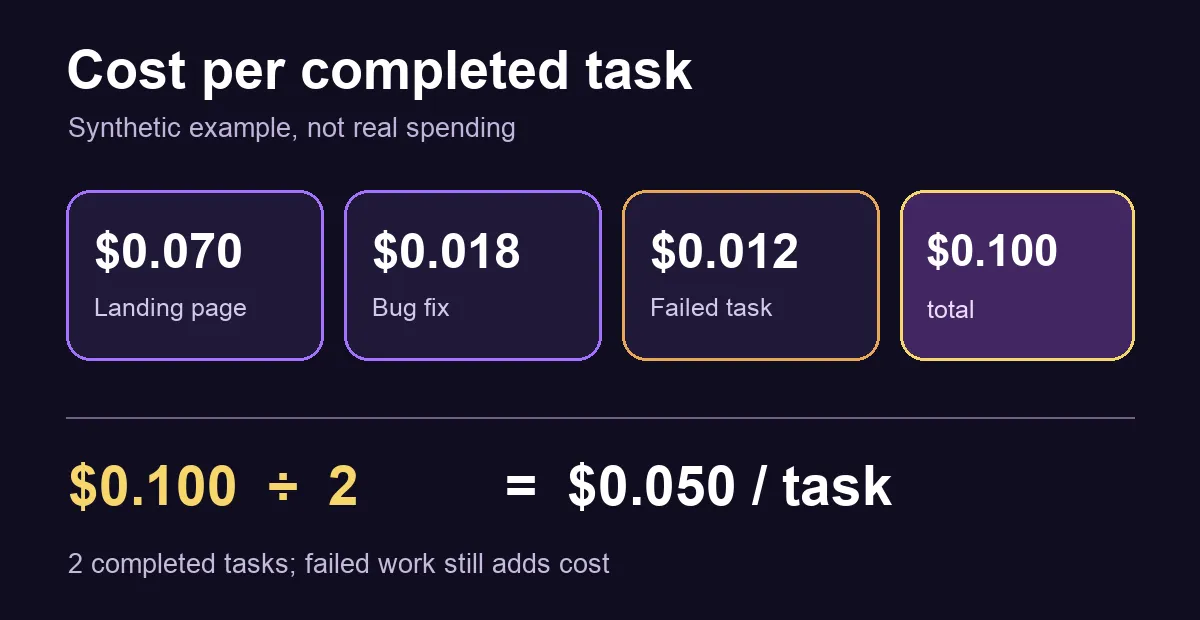
These amounts are synthetic test data, not SoyJB spending or a model price. The landing page used $0.070, the bug fix $0.018 and the failed reply $0.012. Total spend is $0.100 for two completed tasks, or $0.050 per completed result. Removing the failed task from the numerator would make the workflow appear cheaper than it really was.
Save this Python script as cost_per_task.py and run python3 cost_per_task.py log.csv:
import csv
import sys
from collections import defaultdict
from decimal import Decimal
from pathlib import Path


def report(path):
    tasks = defaultdict(lambda: {"cost": Decimal(0), "done": False})
    seen_requests = set()
    with path.open(newline="", encoding="utf-8") as file:
        for row in csv.DictReader(file):
            task, request = row["task"].strip(), row["request_id"].strip()
            if not task or not request or request in seen_requests:
                raise ValueError("task and unique request_id are required")
            seen_requests.add(request)
            cost = Decimal(row["cost_usd"])
            if cost < 0:
                raise ValueError("cost_usd cannot be negative")
            done = row["done"].strip().lower()
            if done not in {"yes", "no"}:
                raise ValueError("done must be yes or no")
            tasks[task]["cost"] += cost
            tasks[task]["done"] |= done == "yes"
    total = sum((data["cost"] for data in tasks.values()), Decimal(0))
    completed = sum(data["done"] for data in tasks.values())
    for task, data in sorted(tasks.items()):
        print(f"{task}: ${data['cost']:.6f} | completed={data['done']}")
    print(f"total=${total:.6f} | completed_tasks={completed}")
    if completed:
        print(f"cost_per_completed_task=${total / completed:.6f}")


if __name__ == "__main__":
    if len(sys.argv) != 2:
        sys.exit("Usage: python3 cost_per_task.py log.csv")
    report(Path(sys.argv[1]))
The script uses Decimal for money, groups rows by task and rejects duplicate request IDs, negative costs and invalid completion values. With no completed task, it prints total spend without dividing by zero. To compare two models, run the same method on comparable task sets. A batch of complex product changes should not be averaged together with trivial summaries if you need a model decision.
Keep the measurement window honest
Choose a time window that covers complete tasks. If a task started on Friday and finished on Monday, put all its requests in the same batch or note the exception. Splitting its spend across periods can make Friday look expensive and Monday look cheap. If a request used provider fallback, use the total cost shown for that request in Logs and keep one request_id. Vercel shows provider attempts inside the request; adding those attempts again as separate requests would double count spend. Reopened tasks need attention too: if a deliverable fails after being marked done, correct done and recalculate the batch.
Scope of this test
We ran the script on the synthetic CSV above and got $0.100 total, two completed tasks and $0.050 per result. We confirmed in Vercel's documentation that Logs contains cost per request. We did not access Joseph's Vercel account or export real logs. Using the displayed request cost is preferable to reconstructing the bill from a public token price, because caching, routing and promotions can change the effective charge.
Measure one workflow for a week, inspect which tasks fail and decide whether the cost per completed result supports more automation. A key or project budget can contain experiments, but this CSV still excludes human review time and any other application infrastructure cost. Track those separately before treating the result as full unit economics.
Sources: Vercel per-request AI Gateway Logs; Vercel AI Gateway budgets.