GPT Image 1 retires October 23: migrate your blog covers safely
OpenAI schedules the retirement of gpt-image-1 for October 23, 2026. Compare its replacements and test your full blog-cover publishing flow before switching.
Başlıklar
If your app generates blog covers through the OpenAI API, check the model ID in your image pipeline. OpenAI lists October 23, 2026 as the scheduled retirement date for gpt-image-1. Replacing a model name in code is quick. Keeping your cover quality, upload flow, and cost under control takes a proper migration test.
OpenAI's official deprecations list names gpt-image-2.5-flare and gpt-image-2.5-sunburst as replacements. The documentation gives a date, not an exact shutdown hour, and we have not run requests in your account. This change concerns an API model ID; it does not mean every image-generation feature in ChatGPT is going away.
Which replacement should you test first?
OpenAI's image-generation guide positions Flare for faster everyday generation and Sunburst for quality-sensitive work and editing precision. For a publishing workflow, I would try Flare for initial concepts and test Sunburst where the finishing details matter: a short headline, a branded composition, or a cover that needs careful editing. That is a suggested editorial workflow, not a benchmark we ran for speed, quality, or price.
Do not evaluate only the file that comes back from the model. A useful cover must leave enough space for the article title, remain readable on a phone, fit your site's aspect ratio, and load from a durable public URL. If the story concerns another company's product, check its visual identity and asset rights. If a real person is the subject, use a properly credited real photograph or a clearly conceptual illustration rather than a synthetic documentary-looking portrait.
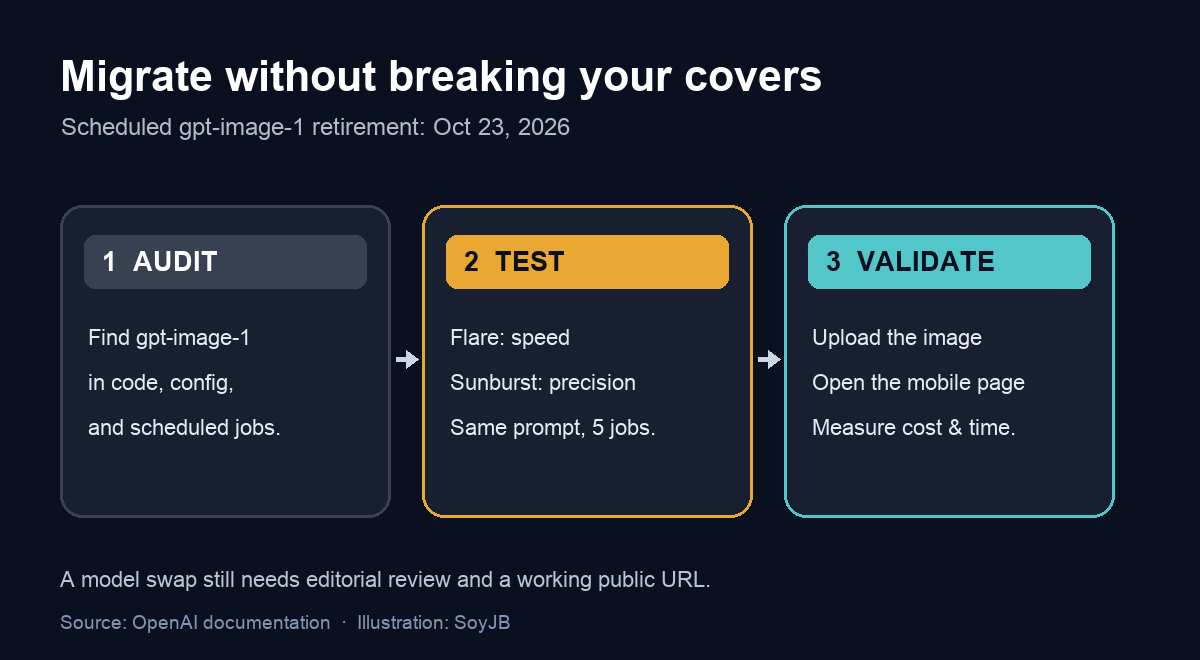
A four-step migration
- Find the exact model ID. Search application code, environment configuration, scheduled jobs, and templates. In a repository, start with
rg 'gpt-image-1([^0-9.]|$)' .. An empty result in one directory does not rule out a setting in another service. - Test the same five jobs on both models. Use a news cover with a short headline, a tutorial diagram, a text-free illustration, an edit of an existing cover, and a brand-sensitive design. Keep the prompt and dimensions consistent so the differences are useful.
- Check the whole publishing chain. Generate the image, decode or download the response as your integration requires, upload it to your blog's storage, assign it to a draft, and open the public page on a phone. A local PNG or a broken image URL is not a completed migration.
- Record the trade-offs. Track generation time, price per usable image, retries, text legibility, and manual editing. Check current rates on OpenAI's pricing page; do not assume either new model costs the same as the old one.
A minimal Python example
The call below follows the shape shown in OpenAI's image API documentation. It requires a current SDK and an OPENAI_API_KEY environment variable. The example is documentation-based and was not executed against a paid API account here. Review the current options for size, quality, response handling, and errors before putting it into production.
import base64
from pathlib import Path
from openai import OpenAI

client = OpenAI()
result = client.images.generate(
    model="gpt-image-2.5-flare",
    prompt=(
        "Wide editorial cover for a practical tutorial about AI content "
        "automation. Show a clean three-step workflow, strong contrast, "
        "and open space for an English headline. No logos or portraits."
    ),
)

image_data = result.data[0].b64_json
if not image_data:
    raise RuntimeError("The response did not include image data")

Path("cover.png").write_bytes(base64.b64decode(image_data))
To compare the quality-focused option, change only model to gpt-image-2.5-sunburst and keep the prompt. OpenAI's image prompting guide can help refine composition and text. If your app uses the Responses image tool rather than this image endpoint, follow its separate tool guide; the code above is not a drop-in replacement for every integration.
The test that matters to a publisher
Publish one test cover to a draft, not five new articles. Ask two people to look at it on a small screen for three seconds: can they tell what the story is about, read the text, and distinguish an illustration from a real product screenshot? If not, revise the prompt or add the headline in your design step. Then verify the stored image, the public article page, and the total cost. The decision is about a reliable publishing system, not just which generated image looks prettier.
Still unverified: the exact retirement hour, parameter compatibility in a specific app, and the price or output quality in your account. Start with OpenAI's deprecation table, generation guide, and current pricing.