“Tomorrow at 9, remind me to review the five stories that matter to my product.” An agent can understand that sentence today. Fulfilling it tomorrow requires a scheduled trigger, a queue, current permissions, and protection against duplicates. Vercel Schedules public beta lets an app create a one-time trigger and send its payload to a Queue topic. This is an architecture for personalized reminders and agent jobs, rather than another announcement about calendars.
When a dynamic schedule fits
Vercel's official example shows an agent scheduling a “tomorrow morning, summarize five stories” task. Instead of polling a database every minute for due work, the app creates a schedule with a time, time zone, destination, and payload. At the due time, Vercel delivers a message to a queue. Your consumer retrieves the task and checks whether it is still authorized. That differs from a fixed private function in vercel.json, which suits a cleanup or a digest shared by the whole app.
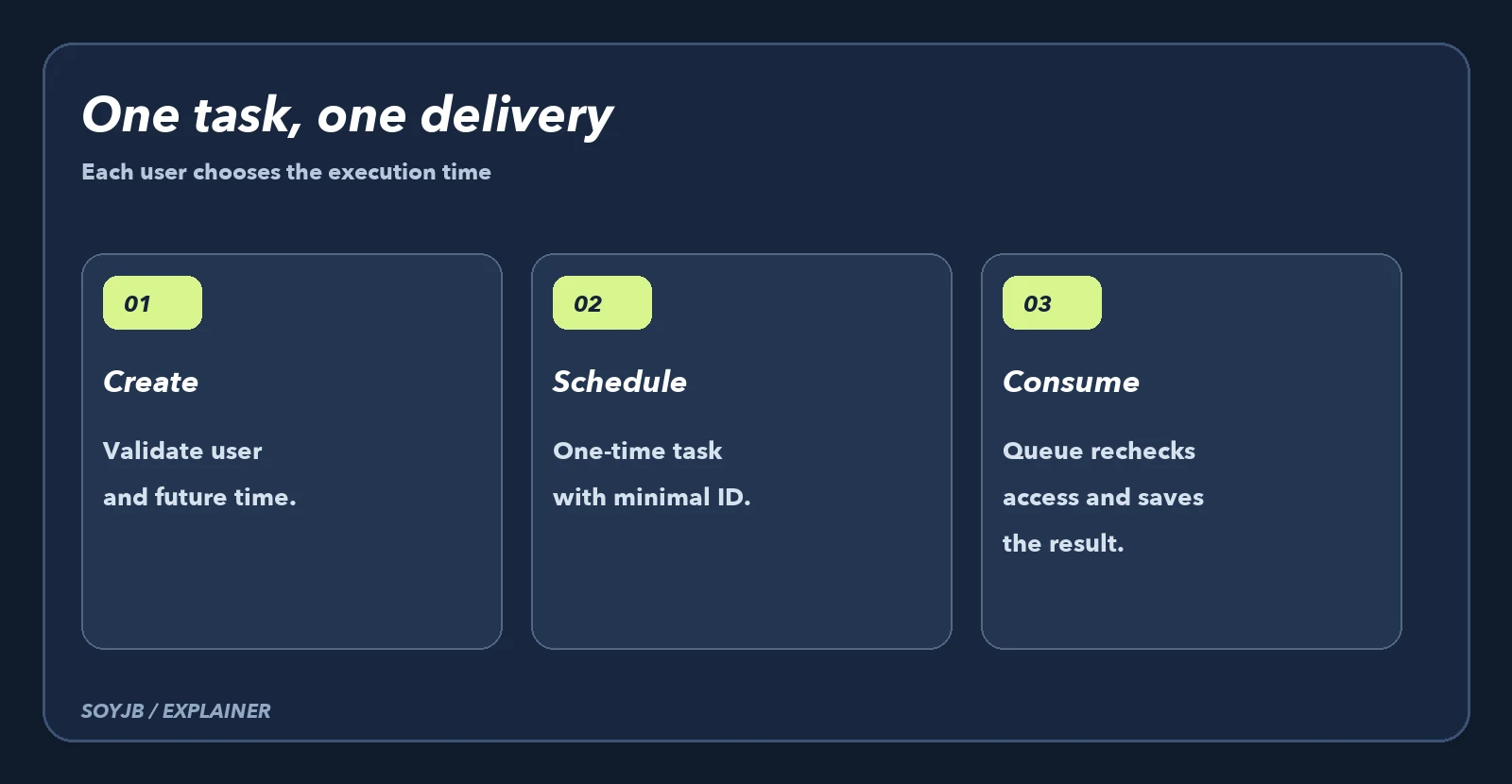
Define the input before creating a schedule: authenticated user, permitted task, future date, and an IANA time zone. Do not accept an agent instruction to “send all my data” without validation. Scheduling preserves intent; it does not grant permanent permission. Store a job ID, owner, state, and due time in your database. The queue payload should hold only the job and user IDs, not secrets or the full text of a sensitive conversation.
Create a one-time trigger
Install the Schedules SDK and configure an agent-work topic and consumer using Vercel's Queues guide. This snippet adapts the structure in Vercel's launch post. Call it from a server endpoint after authentication and validation. at must be a valid future date, and timezone should come from an allowed list. Do not expose this function in a browser where the caller can tamper with the owner ID.
import { randomUUID } from 'node:crypto';
import { Schedules } from '@vercel/schedules';

export async function scheduleReview({
  userId, jobId, at, timezone
}: {
  userId: string;
  jobId: string;
  at: string;
  timezone: string;
}) {
  if (new Date(at).getTime() <= Date.now()) {
    throw new Error('The time must be in the future');
  }
  return Schedules.create({
    name: `review-${randomUUID()}`,
    namespace: userId,
    expression: { type: 'single', at },
    timezone,
    target: { topic: 'agent-work' },
    payload: { userId, jobId }
  });
}
The jobId must reference an existing row that contains the permitted task and a pending state. Save the returned schedule ID so the user can see or cancel the task. Check the Vercel dashboard for a one-time task at the selected time. Start in a Preview environment with a due time a few minutes ahead. SoyJB has not deployed this snippet or run a real Queue consumer in a Vercel account; the SDK shape comes from the vendor example and still needs project configuration.
The consumer makes the final authorization decision
When the private Queue consumer receives { userId, jobId }, load the row by both IDs. If it is already completed, exit without repeating work. If the user cancelled or lost access, mark it cancelled and do not call the agent. Otherwise atomically claim the row by changing pending to running; only the worker that wins that transition creates the summary. Save the result and mark completed. On failure, record the error and decide whether queue redelivery should retry. This matters because queue systems may deliver a message more than once.
Give the agent narrowly scoped tools. For the news example, find five links, preserve their URLs and dates, and produce a sourced summary. Do not publish content or send data to third parties merely because the scheduled time arrived. Show the result in the app and, if the user requested it, send a short notification linking to it. The reminder remains useful even when the underlying stories change overnight.
A small test and the real cost
Test three cases: a valid task delivered once, a task cancelled before due time, and a simulated redelivery that does not duplicate the result. Inspect the schedule history, Queue message, and final database row. The launch says Hobby includes 500 creations and 5,000 runs monthly. Queue, function, and agent-model charges may also apply. The trigger price is not the total cost of creating and delivering a digest.
If every user shares the same time and work, one static schedule may be enough. If each user chooses their own “tomorrow at 9,” dynamic schedules remove the need for constant due-job polling. The core rule remains: the agent can propose a task, while your application owns identity, permission, budget, and delivery.