Your MVP got 300 visits and 20 clicks on “Create account.” How many people actually finished signing up? If you cannot answer, changing the button or buying ads is guesswork. In a Next.js product with GA4, measure the confirmed new account with Google's recommended sign_up event, rather than treating a button click as success.
This walkthrough assumes a working signup flow and an existing GA4 property. SoyJB's analytics connection currently has no GA4 property configured, so these are not results from our site or a claim that this code has been deployed there.
Choose the business action first
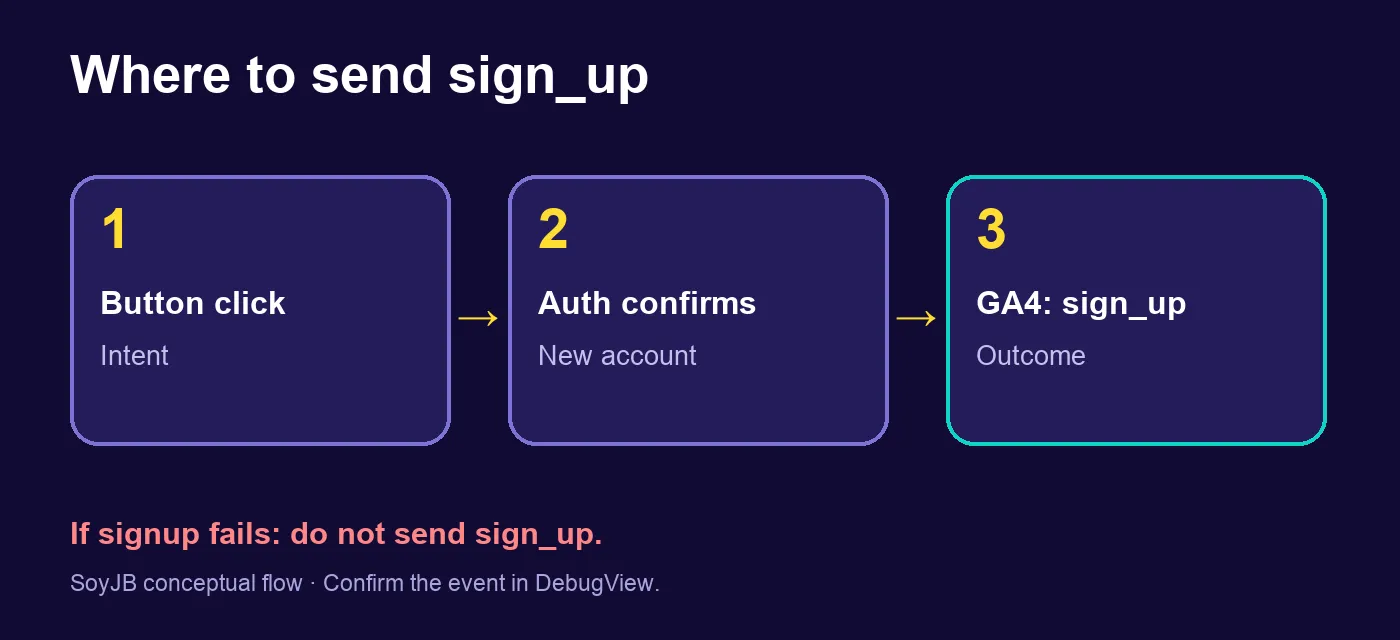
A register-button click expresses intent. Emit sign_up once after your auth service confirms a new user was created. A returning user's successful authentication is a login event, not another signup. Google's recommended events reference includes both names. The optional method parameter can distinguish email from Google signup without sending email addresses or names.
Add GA4 to a Next.js App Router project
Install @next/third-parties if your project does not already have it. Put your G-... measurement ID in a public environment variable. In the root layout:
npm install @next/third-parties// app/layout.tsx
import { GoogleAnalytics } from '@next/third-parties/google';
export default function RootLayout({
children,
}: {
children: React.ReactNode;
}) {
return (
<html lang="en">
<body>
{children}
{process.env.NEXT_PUBLIC_GA_ID && (
<GoogleAnalytics gaId={process.env.NEXT_PUBLIC_GA_ID} />
)}
</body>
</html>
);
}Next.js documents this component and sendGAEvent. Check whether Google Tag Manager or another plugin already inserts the tag. Loading it twice can duplicate measurements, so inspect both the codebase and browser requests before adding a new integration.
Send the event only when creation succeeds
In the client component that awaits your auth provider, call sendGAEvent only after the provider confirms that a new account exists. The exact callback depends on your auth library; this illustrates the placement:
'use client';
import { sendGAEvent } from '@next/third-parties/google';

async function handleRegister() {
  const result = await registerNewAccount(); // Your real auth function
  if (!result.createdNewUser) return;
  sendGAEvent({ event: 'sign_up', method: 'email' });
}
Do not emit sign_up if registration fails or the flow signs in an existing user. If you redirect immediately, verify that the event survives that navigation before depending on it. A server-side event can be appropriate for some architectures, but do not send one from both client and server for the same account. Avoid personally identifying information in event parameters.
Keep a tiny event contract in your repository: name sign_up, trigger “new account confirmed,” optional method, and owner of the implementation. When the auth library changes, this contract helps a reviewer spot accidental double firing or a move of the event to the button handler. It also makes your QA check reproducible across staging and production.
Verify the signal end to end
- Create a test account in an environment where the tag is enabled.
- Use DevTools → Network to look for a Google Analytics request such as
g/collect. Then check Realtime or DebugView in the correct property. - Log in again with the account. It should not emit a second
sign_up. - Force a failed signup. It should emit no signup event. Check consent and ad blockers if the signal never arrives.
Google's verification guide covers browser requests and DebugView. A network request alone is not enough: confirm that the intended GA4 property receives it.
Mark the outcome as a key event
Once sign_up appears in GA4, go to Admin → Events and mark it as a key event. Google's instructions note that this does not rewrite historical data and standard reports may take up to 24 hours to show the change. A GA4 key event is an important product action; a Google Ads conversion is related but has separate reporting behavior.
You can then compare sessions, confirmed registrations, and signup rate for the same period and acquisition channel, provided collection and consent are working. Do not equate button clicks with new users without checking errors and repeats. If many people start the form but few finish, inspect the signup flow before purchasing more traffic.
Primary sources: Next.js third-party libraries; GA4 recommended events; verification; key events. Checked November 17, 2026. Illustrative code, not run against a live product.