You open Copilot to fix an app bug and the model you normally use has disappeared from the picker. Your prompt, instructions, and budget are unchanged, but the output may differ. On October 15, 2026, GitHub announced that it will retire three models across Copilot experiences on November 16. As of this November 10 review, that is six days away. Test a replacement on a real task before the deadline rather than discovering the change during an important coding session.
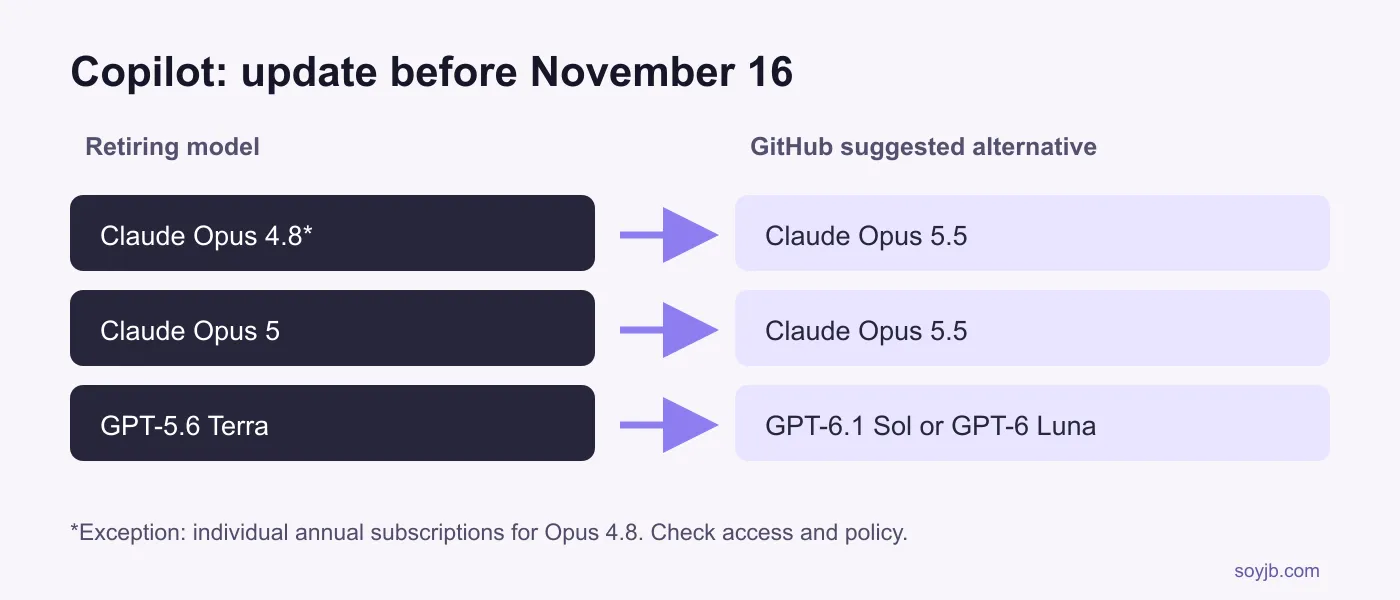
GitHub's official notice names Claude Opus 4.8, Claude Opus 5, and GPT-5.6 Terra. It says the retirement covers Copilot Chat, inline edits, Ask and Agent modes, and completions. GitHub suggests Opus 5.5 for either Opus model, and GPT-6.1 Sol or GPT-6 Luna for GPT-5.6 Terra. This is a GitHub Copilot schedule. The separate Claude Code Opus 4.8 fast retirement has a different product and date.
An exception that matters
GitHub says Claude Opus 4.8 remains available to individual annual Copilot subscribers so they retain an Opus option. Do not generalize that exception to every plan or to Opus 5. An alternative model's availability also depends on your plan, client, and organization policy. Check your own model picker; a public list does not prove a model is enabled for your team.
For Copilot Business and Enterprise, GitHub says suggested replacements are enabled under default model enablement unless an administrator disabled the global default or explicitly blocked a model. Its model access documentation explains how plan, client, and policy affect visibility. If you administer a team, check its model policy before telling users to switch.
A 15-minute migration check
First search your instructions, scripts, integrations, and team docs for the retiring names. If an automation selects a fixed model ID, update it to a replacement your account permits. Then open Copilot Chat, select an available model, and use a short representative task: a bug with a failing test, a small feature, or a PR review. GitHub documents Chat model switching; changing Chat's selection does not automatically change inline suggestions in every client.
Adapt this prompt to your repo: “On this branch, fix the bug reproduced by `tests/checkout.test.ts`. Preserve the public API. Before editing, explain the likely cause; afterward, run the test and show the diff. If you cannot run it, say so and do not claim the bug is resolved.” Use the same repository, test, and acceptance criterion with the current and candidate models while both are accessible. Record elapsed time, files changed, passing tests, changes you reverted, and human review required. A more fluent answer is not evidence of a better code change.
Do not change every automation at once. Start in a test branch and confirm the new model follows your tool and permission rules, does not add unexpected files to the PR, and leaves your suite green. If your plan lacks GitHub's suggested model, document what you can actually select instead of promising equivalence. The notice does not guarantee equal cost, speed, or quality.
What remains unverified
The retirement is announced but has not occurred as of November 10. I did not test these Copilot models or benchmark them; the procedure above is for your account. If a replacement is missing, check plan, client version, and policy before concluding the announcement is wrong. After November 16, inspect automations that used fixed model IDs and the Chat picker. Keep your test results to decide whether a replacement works for your case.
Sources
GitHub Changelog, October 15, 2026; GitHub Docs on model access; GitHub Docs on Chat model switching. Reviewed November 10, 2026.