A coding agent can spend more time preparing an environment than changing a file. If every attempt installs the same dependencies, a reusable environment snapshot can remove that repeated setup. On November 9, 2026, Vercel reported that Sandbox snapshot creation became faster: its median fell from 4.4 seconds to under 0.4 seconds, while p50 restore time fell from 500 to 250 milliseconds. Those are Vercel's measurements. We have not reproduced them on our own workload.
What actually changes for an agent builder
A snapshot captures a Sandbox filesystem and installed packages. In a persistent Sandbox, the default, Vercel creates a snapshot when a session stops and resumes the next session from it. Newly created snapshots use the optimized format; existing snapshots retain the old one. The release note says no new configuration is required for the improvement to apply to new snapshots.
This matters most when an agent runs many short iterations: take an issue, open a repository, run checks, propose a patch, then return later. A prepared snapshot can also give separate attempts the same starting state. But snapshot creation is only one part of the cycle. Startup, initial installation, tests, and model calls may dominate the time the user actually waits.
A 15-minute test on your own workflow
- Pick a small repeatable task, such as fixing input validation in a sample app. Record the commit, region, plan, environment size, and dependency versions.
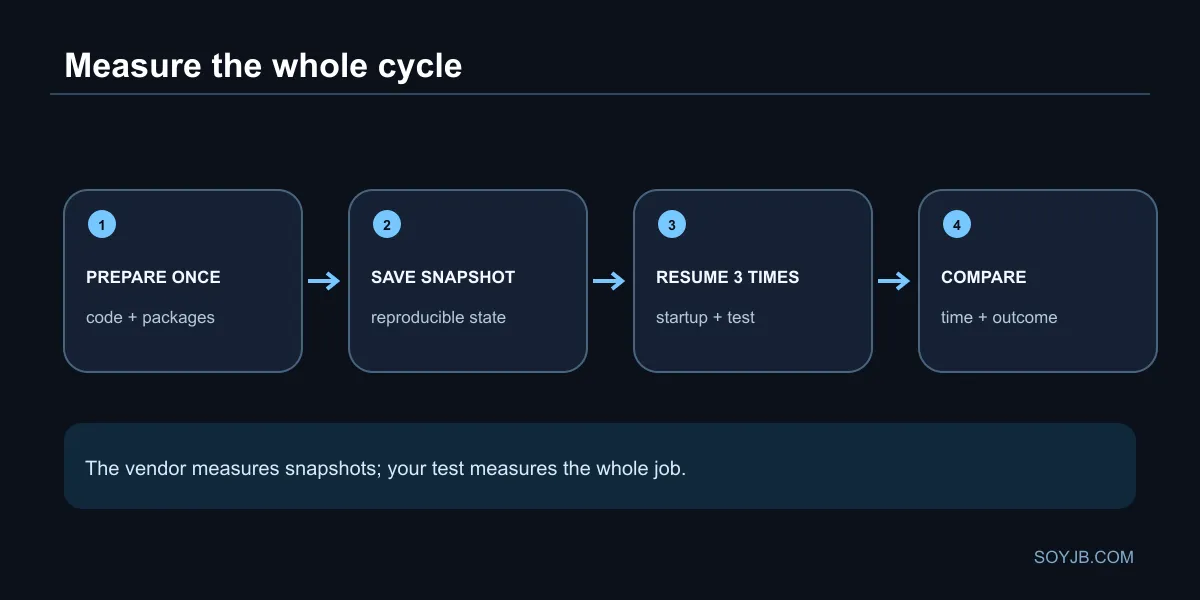
- In a persistent Sandbox, prepare the repository and install packages once. Run the check your agent would run. Stop the session so an automatic snapshot is created.
- Resume the Sandbox three times. Measure time until ready, test duration, and total time until you have a reviewable result. If you have a baseline, compare medians using the same task and configuration.
- Check that the restored code and packages match what you expected. When a dependency changes, create a fresh starting point. A fast snapshot of stale state just reproduces a mistake faster.
A minimal log needs attempt, commit, snapshot_id, startup_s, test_s, total_s, outcome. Do not attribute every change in total_s to the snapshot format: network conditions, model latency, and test load also vary.
The retention trap
Snapshots can outlive the Sandbox that produced them. Deleting a Sandbox does not automatically remove its snapshots, so storage can keep accruing charges. Vercel's documentation states a default expiration of 30 days after last use and provides retention settings, including keeping only the latest N snapshots. Set a cleanup rule before turning every agent step into a checkpoint.
In the pricing table checked November 10, Hobby includes 15 GB of lifetime snapshot storage; Pro lists $0.08 per GB-month, on top of other Sandbox usage dimensions. Pricing and quotas can change. Faster capture does not automatically lower the bill if your workflow keeps more snapshots.
When to act
If your agent repeatedly starts sessions with a heavy dependency tree, measure startup and total time before changing the architecture. If it performs one long-running task, saving a fraction of a second may barely affect the user. Non-persistent Sandboxes do not take the automatic stop-time snapshot. The useful decision is to keep one clean prepared environment, bound retention, and measure the outcome that matters: a correct, reviewable code change.
Sources: Vercel's November 9 announcement, snapshot lifecycle and retention docs, and Sandbox pricing and quotas. Live test on a production workload: not performed.