Your mobile app has users, and you want to test an AdMob banner without turning the screen into an ad. You ask a coding agent to add one, but it could leave a test ID in production, place an interstitial mid-task or skip an integration check. Google's November 16, 2026 announcement gives mobile builders a useful tool today: official agent skills for the Mobile Ads Next-Gen SDK. The larger AdMob assistant and MCP connection have different availability dates.
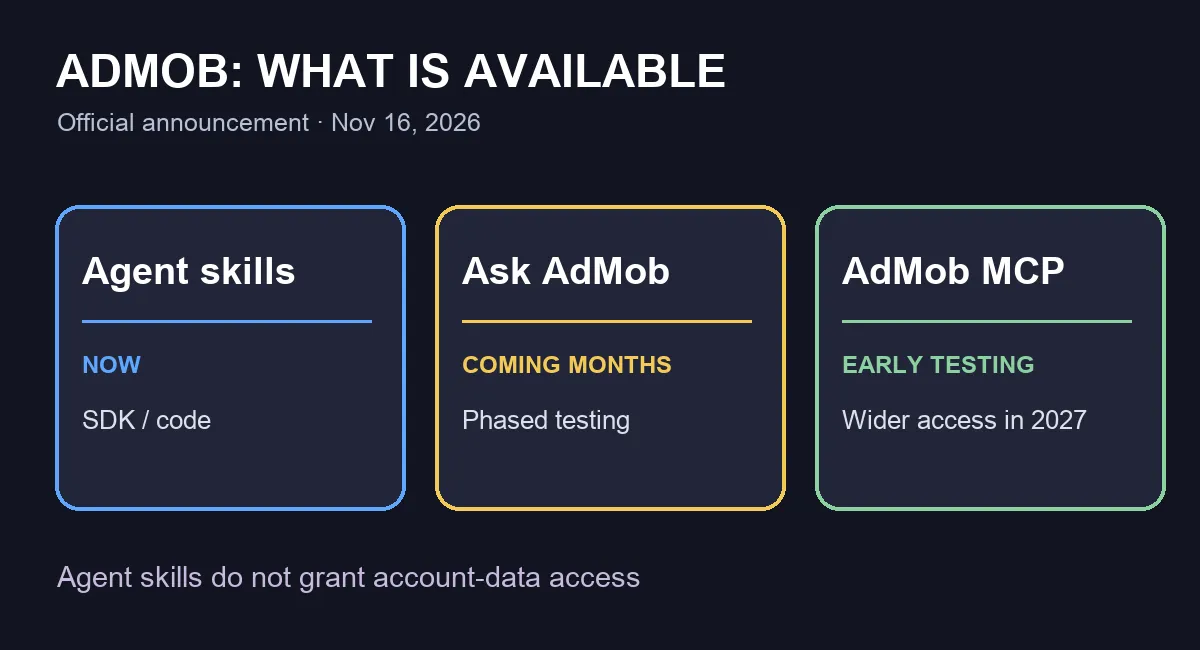
In its official post, Google describes three products. The agent skills already have installation and usage documentation. Ask AdMob will begin testing over the coming months. An AdMob MCP server is in early testing and is expected to expand to more developers early in 2027. Treating all three as generally available now would send a founder looking for a connection that may not yet exist in their account.
What a coding agent can use today
Google's Android developer guide, updated November 16, publishes an installation command and lists skills for SDK setup, banners, interstitials, rewarded ads, migration and validation. It says they work with assistants that support skills, including Codex, Claude Code and Cursor. The official repository lets you inspect the instructions before adding them to a codebase.
npx skills add google/skills/skills/adsThat is Google's documented command. Review the repository and version first, and install in a disposable project or separate branch. A skill gives the agent task-specific instructions for changing code. It is not the forthcoming MCP connection to your AdMob account and does not grant access to revenue reports, ad units or mediation settings. Keep those distinctions clear when deciding what work the agent can actually complete.
A safe test in an Android branch
Open a branch such as try-admob-skill and pick one screen where a banner would not interrupt the user's main task. After reviewing and installing the skills, give your agent this bounded request:
Inspect this Android app and its current Google Mobile Ads integration. Propose one test banner on [SCREEN] using the official Next-Gen SDK guidance. Before editing, list the files and permissions you would change. Use test IDs only; do not alter live ad units or publish the app. Then run the validation skill and report verifiable failures separately from checks that need a human.Review the diff, run the build and test the screen on a device. Check that the ad does not hide controls or appear at an intrusive point. Google's google-mobile-ads-validate skill is intended to check common integration errors and support a prelaunch audit. It cannot replace device testing, policy review or consent checks. If your app is iOS or Unity, start from the matching platform tab in the developer guide rather than copying Android setup steps.
What is still in testing
Google says Ask AdMob will begin testing capabilities over the next few months, including setup troubleshooting, monetization recommendations and natural-language brand-safety rules. Its AdMob MCP server is being developed to let an agent read account data and propose ad units or mediation changes, with human review and approval. Google describes early testing and an expansion to more developers early next year, not general access today. The announcement does not provide a general release date or a specific price for these AI features.
The decision this week is to test a narrow skill-assisted change if you already maintain an AdMob app, and to record whether validation catches a real issue. If you do not use AdMob, this news does not create a monetization strategy by itself. SoyJB checked the official announcement, documentation and repository; we did not install the skills into Joseph's app or connect an AdMob account.
Sources: Google's November 16, 2026 AdMob announcement; Google Developers agent skills guide; official google/skills repository.