You recorded a twenty-minute interview and remember the line “the demo broke when a new user signed in.” Instead of scrubbing blindly, use the SRT subtitle file to find its timestamp, leave a little lead-in, and prepare a 25-second clip. The transcript is an index; the original video is still the source of truth. This local script prints an FFmpeg command and makes you review the excerpt before publishing it.
Inputs and limits
You need the original video, an .srt file timed to that same video, Python 3, and FFmpeg installed to perform the cut. An SRT made from a version with a different intro will have wrong timestamps. Check a line near the beginning, middle, and end in your player. If the offset is constant, fix the subtitle timing first. If drift grows, align the SRT against the correct video rather than blindly shifting every cue.
This tutorial is about selecting and cutting a source clip, not establishing whether AI transcription is accurate. Check names, numbers, and quotations against the audio first. A plausible line in an automatically generated SRT is not enough to attribute it to a speaker.
A small SRT you can use to repeat the calculation
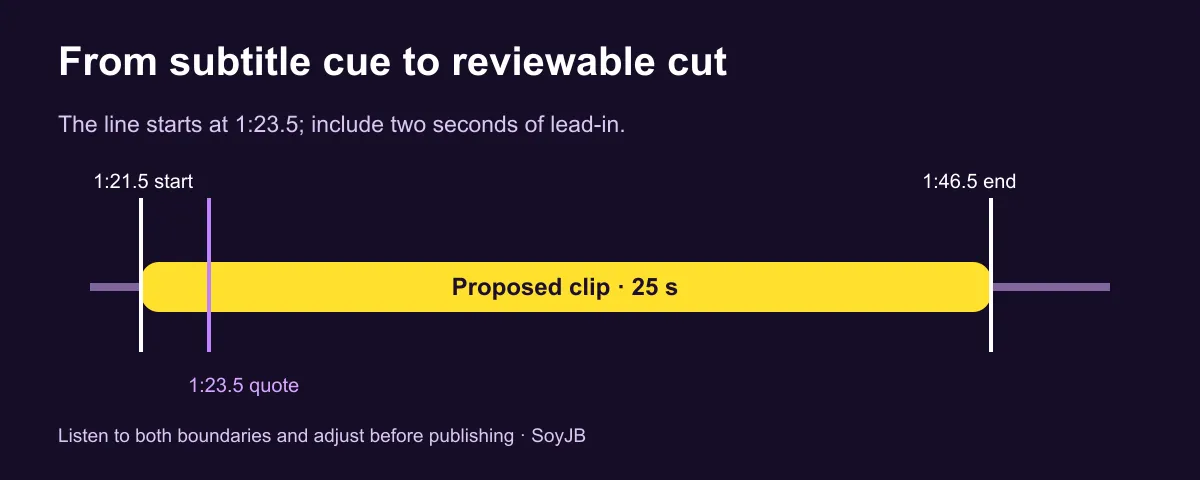
Save the following as sample.srt. The target line starts at 1:23.500. The script places the clip start two seconds earlier, at 1:21.500, which FFmpeg accepts as 81.500 seconds.
1
00:01:20,000 --> 00:01:23,200
Let's discuss today's test.

2
00:01:23,500 --> 00:01:29,000
The demo broke when a new user signed in.

3
00:01:29,200 --> 00:01:34,000
So we fixed the access check first.

4
00:01:34,300 --> 00:01:40,000
Then we tried another account.
Find one line and prepare a command
Save this as clip-from-srt.py. It searches for a single case-insensitive phrase, rejects missing or duplicate matches, and checks that the requested duration reaches the matched subtitle's end. It does not execute FFmpeg or alter your video; it prints a command for you to inspect.
"""Print a reviewable FFmpeg clip command from one SRT phrase. No video is edited here."""
from pathlib import Path
import re
import shlex
import sys

STAMP = re.compile(r"^(\d{2}):(\d{2}):(\d{2}),(\d{3})$")


def seconds(value):
    match = STAMP.fullmatch(value.strip())
    if not match:
        raise ValueError(f"Invalid SRT timestamp: {value!r}")
    hours, minutes, whole, millis = map(int, match.groups())
    return hours * 3600 + minutes * 60 + whole + millis / 1000


def cues(path):
    for block in re.split(r"\n\s*\n", Path(path).read_text(encoding="utf-8-sig").strip()):
        lines = block.splitlines()
        line = next((line for line in lines if " --> " in line), None)
        if line is None:
            continue
        start_text, end_text = line.split(" --> ", 1)
        start, end = seconds(start_text), seconds(end_text.split()[0])
        if end <= start:
            raise ValueError(f"Non-positive cue: {line}")
        index = lines.index(line)
        yield start, end, " ".join(lines[index + 1:]).strip()


def command(srt, video, phrase, clip_seconds=25):
    matching = [(start, end, text) for start, end, text in cues(srt)
                if phrase.casefold() in text.casefold()]
    if len(matching) != 1:
        raise ValueError(f"Expected one matching cue, found {len(matching)}")
    start, end, text = matching[0]
    clip_start = max(0, start - 2)
    duration = float(clip_seconds)
    if duration <= end - clip_start:
        raise ValueError("Clip ends before the matched subtitle finishes")
    args = ["ffmpeg", "-ss", f"{clip_start:.3f}", "-i", str(video),
            "-t", f"{duration:.3f}", "-c:v", "libx264", "-crf", "18",
            "-preset", "medium", "-c:a", "aac", "-movflags", "+faststart",
            "clip.mp4"]
    return text, shlex.join(args)


if __name__ == "__main__":
    if len(sys.argv) not in (4, 5):
        raise SystemExit("Usage: python3 clip-from-srt.py subtitles.srt video.mp4 'phrase' [seconds]")
    text, cmd = command(sys.argv[1], sys.argv[2], sys.argv[3],
                        float(sys.argv[4]) if len(sys.argv) == 5 else 25)
    print(f"Matched subtitle: {text}\nReview the surrounding audio and boundaries, then run:\n{cmd}")
Run python3 clip-from-srt.py sample.srt interview.mp4 "demo broke" 25. The printed command is ffmpeg -ss 81.500 -i interview.mp4 -t 25.000 -c:v libx264 -crf 18 -preset medium -c:a aac -movflags +faststart clip.mp4. Replace interview.mp4 with your own file; the sample SRT does not include a video. We ran four local checks covering the target phrase, an absent phrase, a duplicate phrase, and a duration too short to contain the cue. We did not execute the FFmpeg command here because this environment has neither FFmpeg nor source footage.
Why re-encode, then review the edit
The official FFmpeg manual says -ss before -i seeks the input. With transcoding, accurate seeking is enabled by default and discards material before the requested point. -t limits output duration. The command uses libx264 and aac instead of -c copy because stream copying can retain earlier material around a keyframe. Inspect both ends: a mathematically correct cut can still interrupt a breath, a premise, or the next sentence needed to understand the quote.
Before publishing, listen with subtitles on and off and verify three things: the speaker really said the line, the surrounding context does not reverse its meaning, and you have permission to reuse the recording. This command does not make a vertical video; validate the excerpt before reframing it for Shorts or Reels. If the phrase appears twice, search for a more specific fragment. The script deliberately stops instead of guessing which occurrence you meant.
The working sequence is: verify the SRT, find the phrase, generate the command, watch the clip, adjust the boundaries by ear, then export and publish. AI can help locate material without fabricating a quotation or replacing editorial judgment.