
Your app says it cannot find an invoice even though the document is in the knowledge base. The embedding endpoint works, search returns three results, and the chatbot answers confidently. The failure happened earlier: the correct document no longer appears near the top. When you change an embedding model, index, chunking strategy, or filter, check retrieval before you ship.
This small test uses three support questions and a JSON file. It needs no AI API key: you supply the actual document IDs returned by your search system before and after the change. A short Python script checks whether the expected document appears in the first three results, reports the total, and exits with a failure code if a previously passing query regresses.
Build a fixture from real user questions
Pick questions people actually ask: canceling a subscription, downloading an invoice, or understanding when a trial ends. For each query, manually identify the document that should be retrieved. Record a stable document or chunk ID, not the LLM's generated answer. A fluent answer can hide a missing source.
Google's evaluation API defines docRecall@k as the fraction of relevant documents retrieved in the top k. Our simpler Hit@3 asks only whether one expected document appears in the first three. It catches clear losses, but does not grade the final answer or replace an evaluation with multiple relevant documents.
Save the following as cases.json. These are invented examples, chosen so one regression can be reproduced:
[
  {"query":"How do I cancel my subscription?","expected":"cancel-policy",
   "before":["billing","cancel-policy","refunds"],
   "after":["cancel-policy","billing","refunds"]},
  {"query":"Can I download an invoice?","expected":"invoices",
   "before":["pricing","invoices","tax"],
   "after":["pricing","tax","receipts"]},
  {"query":"What happens when my trial ends?","expected":"trial-expiry",
   "before":["trial-expiry","plans","billing"],
   "after":["plans","trial-expiry","billing"]}
]
The before and after arrays contain document IDs in returned order. Keep the query, corpus, filters, and k fixed. If you change the data and the model at once, you will not know which change caused the result.
To populate the file for a real app, call your search function directly and record the first three IDs before deploying the change. Repeat the same query against the candidate version. If the app exposes only a chatbot answer, temporarily log retrieved IDs or add a private diagnostic view. Do not copy personal data or full customer documents into the fixture; stable IDs and anonymized queries are enough. Keep the fixture in version control so future changes have the same baseline.
Run a deployment gate in plain Python
Save this as check_retrieval.py. It uses only the standard library:
import json, sys

cases = json.load(open(sys.argv[1], encoding="utf-8"))
if not cases:
    raise SystemExit("No cases")

before_hits = after_hits = 0
regressions = []
for case in cases:
    before = case["expected"] in case["before"][:3]
    after = case["expected"] in case["after"][:3]
    before_hits += before
    after_hits += after
    if before and not after:
        regressions.append(case["query"])

n = len(cases)
print(f"Hit@3 before: {before_hits}/{n} ({before_hits/n:.0%})")
print(f"Hit@3 after: {after_hits}/{n} ({after_hits/n:.0%})")
for query in regressions:
    print(f"REGRESSION: {query}")
sys.exit(1 if regressions else 0)
Run python3 check_retrieval.py cases.json. With the sample data, it reports 3/3 before, 2/3 after, and one invoice regression, then exits with code 1. I tested this criterion on the synthetic fixture. I have not tested your production index, and these percentages are not product performance results.
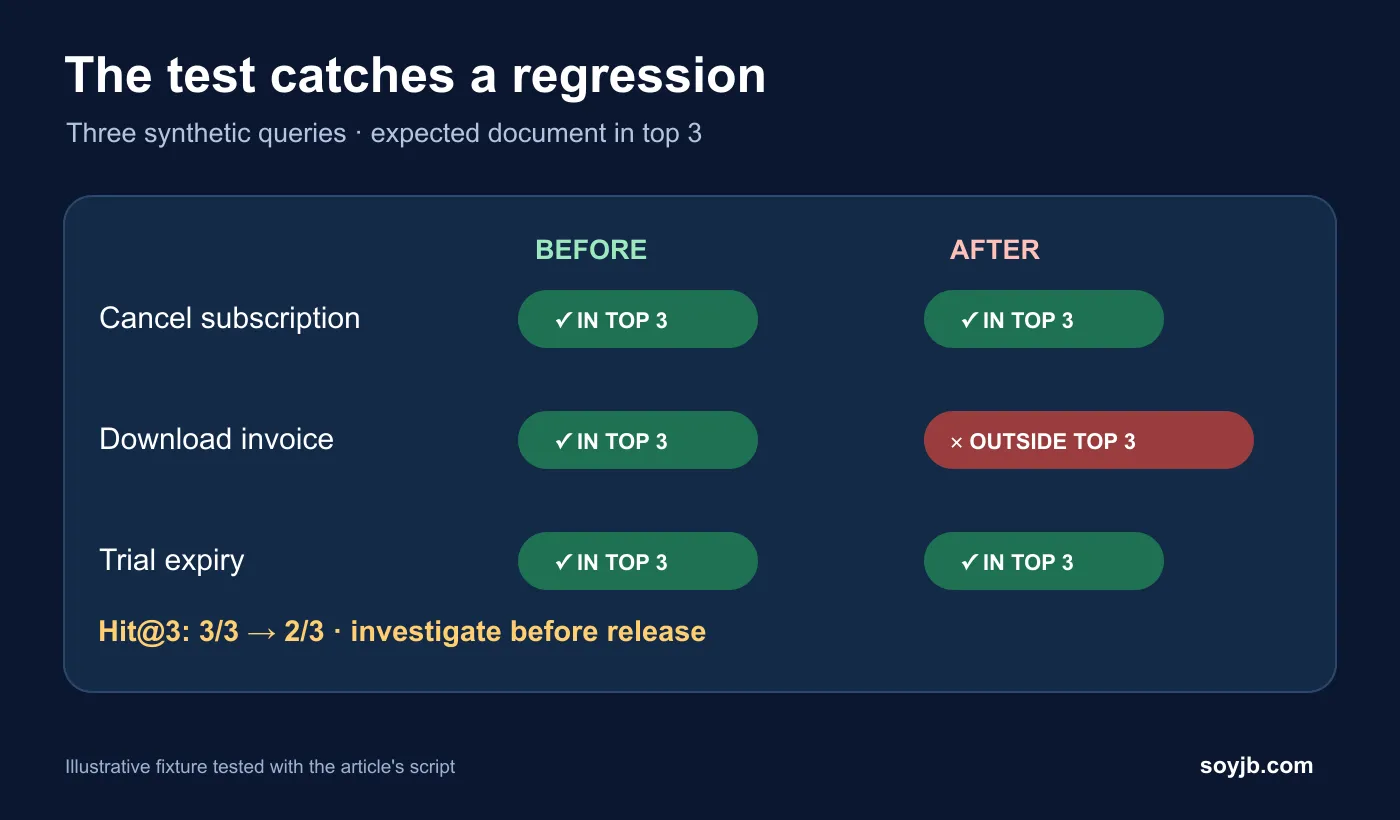
When the test fails
- Inspect the failed query and the documents that displaced the expected one. Verify filters, access permissions, language, and whether the expected document is still indexed.
- If you changed embedding models, check whether the query and index vectors are compatible. Google distinguishes the Embedding 2 Preview-to-stable update, which needs no reindex, from the Embedding 001-to-2 migration, which does.
- If the vectors are valid, inspect chunking, metadata, ranking, and
top_k. Change one variable at a time and rerun the same fixture.
Start with five to ten real queries to catch obvious failures, then expand across topics, languages, and permission levels. Hold out a separate set that you do not use for tuning, or you may optimize only the examples you already know. A perfect score on three toy questions does not certify excellent search; a drop on a business-critical question is still worth investigating.
Record the expected document's rank as well as whether it appears. A move from first to third still passes Hit@3 but may make it less likely that the answer generator uses that source. Once retrieval passes, evaluate the answer separately: does it cite the correct source, and does it make claims unsupported by the retrieved text? Those are different failure modes and need different checks.