Your app is summarizing ten documents. Gemini returns 503. Your agent retries, but the user clicks again, and the workflow eventually creates two outputs, two emails, or two charges. On another day it sees 429, retries twenty times, and only adds pressure to a project that already hit a limit. Retries are useful; treating every failure as a short wait is the mistake.
This guide focuses on the server-side decision when calling Gemini's generateContent API. A separate SoyJB guide tests whether a chat UI preserves the user's message after a 429. Here we decide when the provider call should repeat, when it should stop, and how to keep a repeated model generation from repeating an external action. I did not run this code against a live Gemini account for this article; I tested the branches with simulated HTTP responses.
429 and 503 are different signals
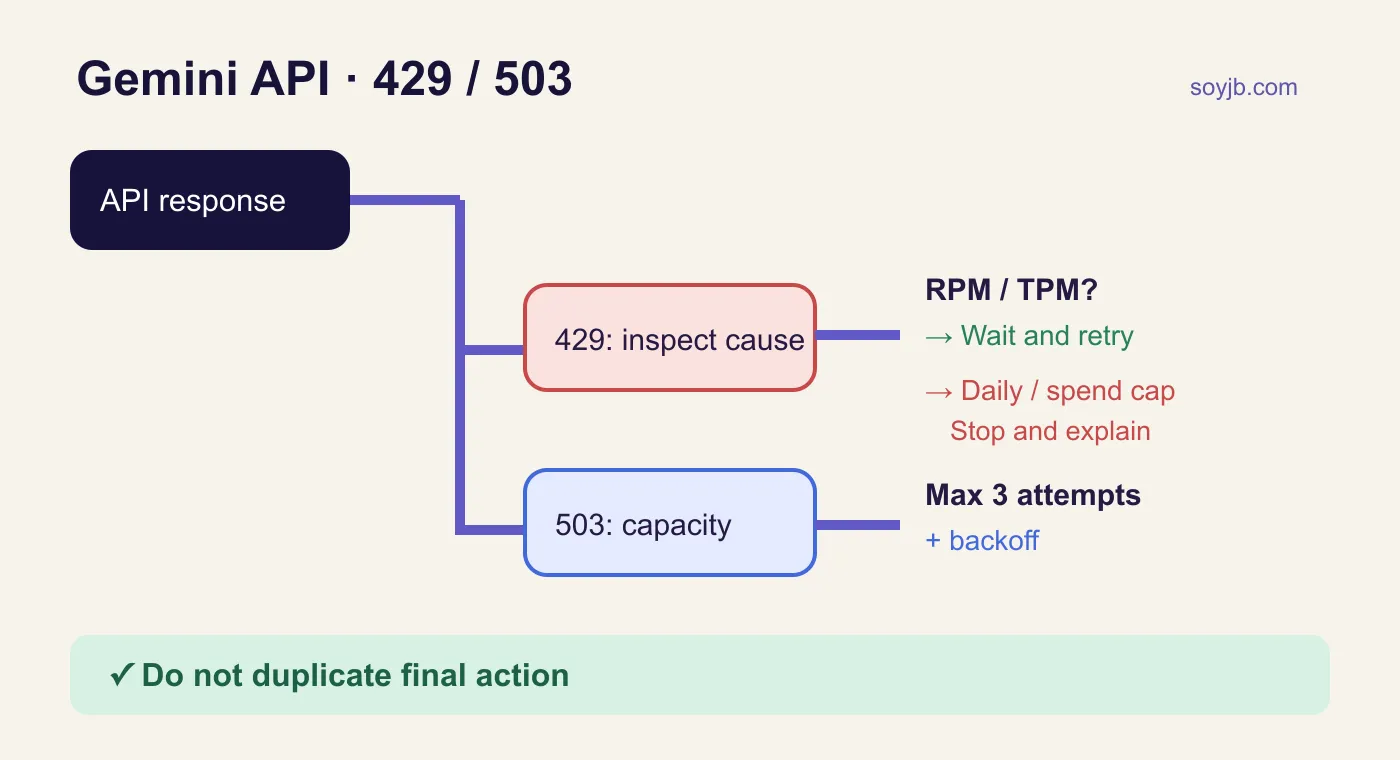
Google's official generateContent error reference says 429 RESOURCE_EXHAUSTED can mean requests per minute, tokens per minute, daily quota, or a spending limit. A daily cap will not clear because you waited two seconds. Inspect the actual error message and your project's limits in AI Studio. Limits are project-wide, not per API key, and vary by model and usage tier.
503 UNAVAILABLE means the service may be overloaded or temporarily out of capacity. A Google team member explained in the developer forum that 503 is unrelated to quota and recommended bounded retries with backoff, or Batch API for nonurgent jobs. That advice does not promise the next call will succeed. Set a time budget and give users a clear way out.
A bounded server function
This Node 18+ example calls generateContent. Keep the API key on the server, never in browser code. It returns text only after a successful provider response. A 503 gets at most three total attempts. A 429 is retried only when the message explicitly identifies a short RPM/TPM limit; ambiguous, daily, or spend-related errors stop. Provider wording can change, so treat this conservative classifier as a starting point and inspect production logs.
// Node 18+. A demo of bounded retries for the legacy Gemini generateContent API.
// Set GEMINI_API_KEY and GEMINI_MODEL to make a real request.
const pause = ms => new Promise(resolve => setTimeout(resolve, ms));

export async function generateWithRetry({ prompt, key, model, fetcher = fetch, wait = pause }) {
  if (!prompt || !key || !model) throw new Error('prompt, key, and model are required');
  const url = `https://generativelanguage.googleapis.com/v1beta/models/${encodeURIComponent(model)}:generateContent`;
  for (let attempt = 1; attempt <= 3; attempt++) {
    const response = await fetcher(url, {
      method: 'POST',
      headers: { 'Content-Type': 'application/json', 'x-goog-api-key': key },
      body: JSON.stringify({ contents: [{ parts: [{ text: prompt }] }] }),
      signal: AbortSignal.timeout(20000),
    });
    const data = await response.json().catch(() => ({}));
    if (response.ok) return data.candidates?.[0]?.content?.parts?.map(p => p.text ?? '').join('') ?? '';

    const message = String(data.error?.message ?? '');
    const shortLimit = response.status === 429 &&
      /per.minute|per.second|RPM|TPM|rate limit/i.test(message) &&
      !/daily|per.day|RPD|spend|billing|balance|prepay/i.test(message);
    const temporary = response.status === 503 || shortLimit;
    if (!temporary || attempt === 3) {
      throw new Error(`Gemini HTTP ${response.status}: ${message || 'check logs and project limits'}`);
    }
    const seconds = Number(response.headers?.get('retry-after'));
    const delay = Number.isFinite(seconds) && seconds > 0
      ? Math.min(seconds * 1000, 10000)
      : Math.min(500 * 2 ** (attempt - 1) + Math.random() * 250, 10000);
    await wait(delay);
  }
}
Save the function as gemini-retry.mjs and call generateWithRetry({prompt, key: process.env.GEMINI_API_KEY, model: process.env.GEMINI_MODEL}) from a server route. Set a model your project can use and check the current model list. The function honors a numeric Retry-After value up to ten seconds. Otherwise it uses short exponential delays with jitter, so multiple workers do not retry in lockstep. A network timeout is returned as an error here; decide separately whether your operation is safe to repeat.
Test the policy without spending quota
I injected fake fetcher and wait functions and ran five local Node scenarios: two 503 failures before success, one RPM-specific 429 before success, and three errors that must stop immediately (daily quota, spending cap, and 403). Those tests passed. They validate the code branches; they do not establish the latency, capacity, or exact error wording in your account. In production, log HTTP status, provider code/message, model, project, attempt number, and duration without unnecessarily storing sensitive prompts. Check the real limits in AI Studio.
Keep the original message in the UI and explain that no final answer arrived. If the model output triggers an email, article publication, or payment, separate that action from generation and protect it with a persistent unique operation ID. Repeating a model call must not repeat the downstream side effect. This example deliberately does not implement a database idempotency record: its design depends on your storage and action. A fetch retry alone cannot guarantee exactly-once delivery.
When to change the workflow
For hundreds of documents that do not need an immediate response, consider Batch API. If 429s recur, reduce concurrency, context size, or request frequency before asking for higher limits. If 503 persists after the bounded attempts, stop the spinner and keep the task pending or resumable. Measure success after the first retry, p95 latency, and cost per completed task before adopting the policy widely.
Sources and scope
Google's generateContent error reference; project rate limits; Gemini team guidance on 429/503. Check the docs for your actual endpoint: the newer Interactions API has its own error codes and format. Reviewed November 10, 2026.