You want a morning update on two AI tools without opening ten tabs. Claude in Chrome lets you save an instruction as a shortcut and schedule it to recur. A useful first application is a private launch radar: read official pages, record dates and original links, then leave the editorial decision to you. A scheduled browser task is not the same thing as an autonomous publisher.
Anthropic's help guide, checked by SoyJB on November 13, 2026, describes daily, weekly, monthly and yearly browser tasks from the clock icon in the extension panel. It also says background workflows continue when you change tabs as long as Chrome remains open. That matters if your laptop sleeps or you close the browser.
Build a first task you can actually verify
- Install Claude in Chrome from Anthropic's official page in desktop Chrome, sign in with an eligible paid plan and review the extension permissions. Anthropic does not support the extension on other Chromium browsers or mobile devices.
- Open two official pages that report product changes, such as a changelog and documentation. Choose the tabs or tab group Claude should inspect. Use pages without sensitive account data for this trial.
- Request a test report. Check three things manually: every link points to the original source, the date belongs to the event, and an empty day is not rewritten as a fabricated launch.
- Once that works, save the instruction as a shortcut. Use the clock icon in the extension panel to choose a time and frequency. Observe one scheduled run, its notification and the resulting report.
Copyable shortcut prompt:
Inspect only the official tabs I selected. Find items published since the previous report. For each change, return: product, one-sentence change, publication date, original URL, availability, known limit, and one small test I can run today. If the source does not state a date, price or access condition, write “not verified.” Do not treat an X post as confirmation of the product. Do not publish, send messages or edit any page. If there are no verifiable changes, say “no verified updates.”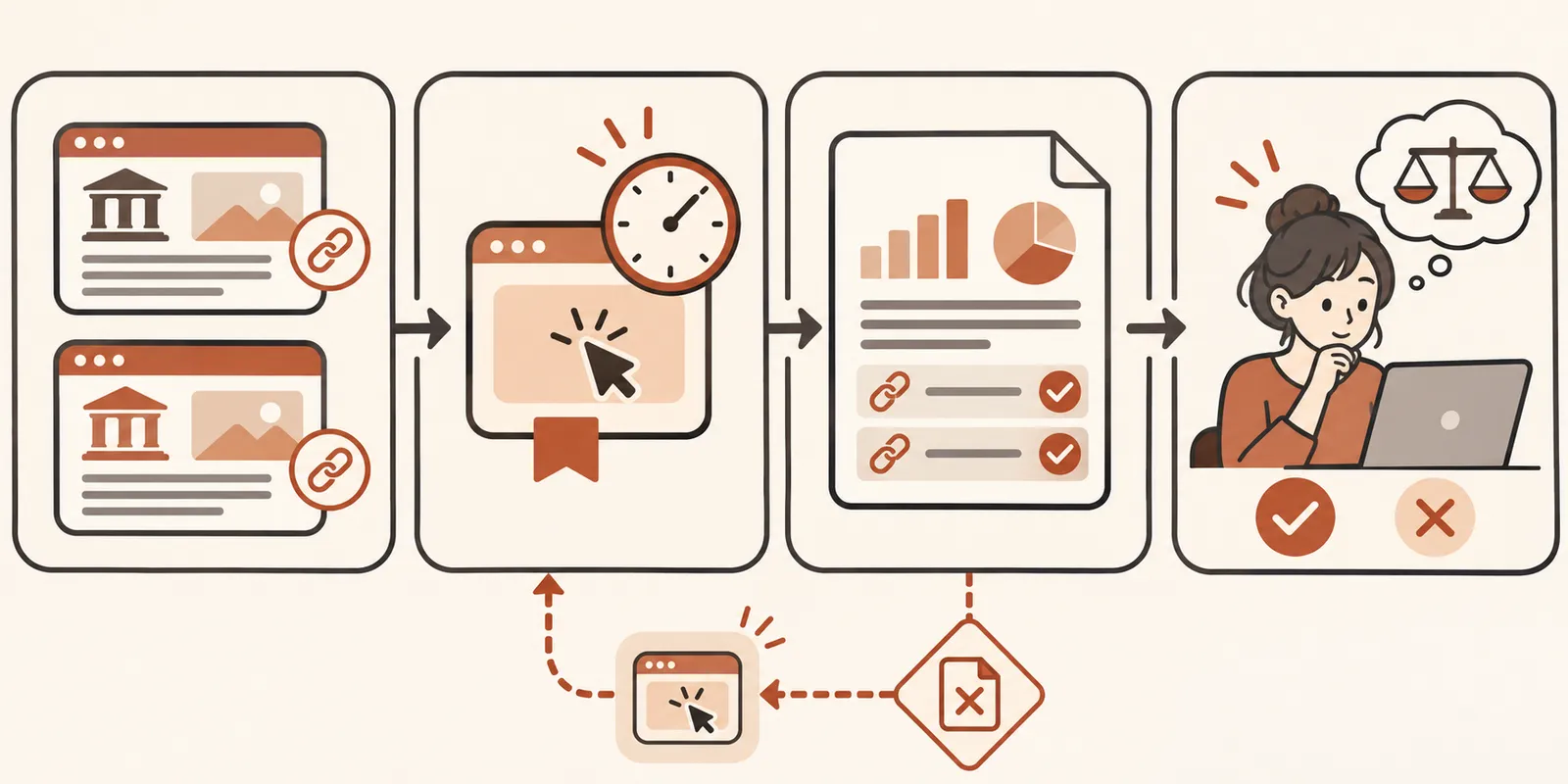
Two limits that affect reliability
The browser is part of the runtime. Anthropic says background workflows can keep going after you switch tabs while Chrome stays open. Do not assume a run succeeded when the machine was shut down. At the start of your day, check for a report dated today; if none exists, run the shortcut once and avoid duplicate output. The help page does not promise automatic recovery after the browser closes.
Web pages can change and contain misleading instructions. Keep the scope to known official sources, require original URLs, and do not grant publishing, payment or account-editing permissions to this first workflow. Anthropic's browser safety guide explains the risks of acting on page content. Separate reporting from any action that affects accounts or customers.
Saved shortcut versus recorded workflow
Anthropic lets you save a working prompt as a shortcut and schedule it. It also documents recording browser steps in the classic side panel, but says recording is unavailable when the panel runs as a Cowork session. If you cannot see a record button, that alone does not show that scheduling is unavailable. Start with a text shortcut and check for the clock icon in your version. Team and Enterprise administrators may restrict the extension and accessible sites. Official feature guide.
Success is modest and measurable: for a week, the radar produces correctly dated reports, zero invented links, and less review time than your manual process. If it fails, save the URL and exact failed step. We have not scheduled a task in a reader's account; this is a reproducible workflow based on Anthropic's documentation.