You have clips for a short video, but the transition shot that makes the story work is missing. On November 10, 2026, Adobe announced Firefly features for arranging clips, adding captions, and generating transitions or supporting footage. It also brought UMG and WMG music into Premiere on iPhone. For a creator, the decisive question is not just which tool to try: is this a personal video or one promoting a business? The new music license changes the answer.
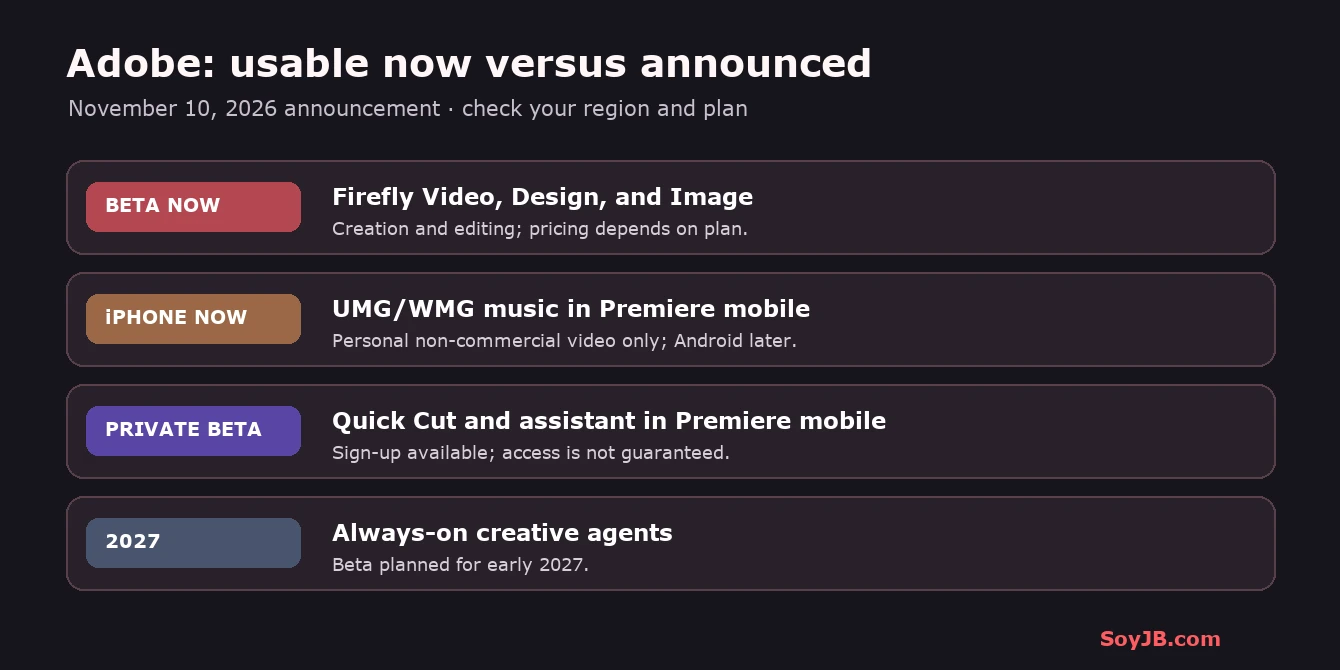
Adobe's announcement separates four availability states. New Firefly Video, Design, and Image capabilities are available now in beta; Quick Actions is generally available. The new Premiere music is on iPhone for personal, non-commercial videos, with Android support to come. Quick Cut and the Premiere editing assistant are in a private beta with sign-up. Recurring always-on creative agents are planned for an early-2027 beta. Do not build today's production workflow around a feature you cannot access yet.
What changes for a short-form video workflow
Adobe says Firefly Video now lets creators bring in their own footage, map the story, arrange clips, add captions, and generate transitions or b-roll for missing shots. Firefly Design combines images, illustrations, animations, and 3D elements on one canvas. Firefly Image can remove distractions, change text, adjust light, and retouch details. Quick Actions offers fast tasks such as thumbnails and product ads. The practical promise is fewer handoffs between footage, edit, and generated support material. The announcement does not establish that its output beats your current workflow or that every feature appears in every account.
The Creative Agent in Firefly can help explore concepts and let you review a plan before execution; Adobe also mentions it in Firefly Boards. That present assistance is separate from always-on agents that could organize incoming footage while you are away. Adobe places the latter in an early-2027 beta. Likewise, Quick Cut's editable first cut from phone footage is part of Premiere mobile's private beta, not a generally available feature for all creators.
A 30-minute test without rebuilding your process
- Choose a 20–45-second video with three clips you own: opening, evidence, and closing. Define the message and audience before editing. Use footage you have the right to publish.
- If your account has Firefly Video beta, upload a copy of the clips. Ask for a narrative order, editable captions, and one transition or missing-shot idea. Keep the originals separate for comparison.
- Review generated b-roll frame by frame. Could it be mistaken for footage you actually filmed? Avoid invented product details or a synthetic documentary depiction of a real person. Correct names, captions, and timing yourself.
- Export two versions: your usual edit and the Firefly-assisted draft. Compare minutes spent, corrections needed, message clarity, and whether a viewer understands the story unaided.
This is a SoyJB experiment plan, not a benchmark we ran. I did not use Joseph's Adobe account or pay for generations to measure quality or speed. Adobe calls the new Firefly capabilities beta features and points to its plans page for pricing. Check your account's credits, limits, and applicable rights before budgeting a video series.
Music is a rights decision
Premiere mobile now offers a searchable UMG and WMG catalog, trending tracks, and artist-inspired templates on iPhone. Adobe's stated restriction is explicit: the catalog is for personal, non-commercial videos. If your video sells a course, includes a paid collaboration, promotes your startup, or is an ad, do not assume a song is cleared merely because it appears in the editor. Adobe directs projects needing commercially licensed music to Adobe Stock Audio. Check the specific license and permitted distribution channels before publishing.
For a personal social video, also review the destination platform's terms and any monetization conditions. For a brand, choose audio before cutting: use a track with clear commercial rights or music you own. Replacing the song at the end can force a re-edit of cuts and transitions. In-app availability is not universal permission for every platform and use.
What to try now and what to watch
If you edit weekly, test Firefly beta with a low-risk clip and measure correction time. If you need music for a personal iPhone video, inspect the new catalog. If you want agent-driven Quick Cut, sign up for the private beta and keep your current editing flow until access is granted. If recurring footage organization is your goal, watch the 2027 beta as a future signal rather than an operational tool today.
Source and scope
Adobe, November 10, 2026 announcement, reviewed November 11, 2026. The cover and diagram are SoyJB illustrations, not Firefly or Premiere screenshots. The test flow is an editorial proposal; verify access, prices, and rights for your own account and project.