A 60-second video works for your Spanish-speaking audience and you want to try it in English. AI dubbing looks like a one-click translation, yet the output can mispronounce your name, change a number, flatten a punchline, or leave Spanish on-screen captions untouched. The useful workflow is to generate a first audio track, then review it as an editor before publishing.
ElevenLabs Dubbing accepts an audio or video file, or a YouTube or TikTok URL, and can generate a target-language dub. Dubbing v2 aims to preserve traits of the original voice and lets you edit source transcript and translated segments in the interface. That saves manual production time, but it does not make an automated translation editorially ready for a different audience. This guide uses a Spanish video you own and adapts it to English; it does not suggest copying someone else's voice without permission.
Prepare a short video and a clear goal
Choose a 30–90-second clip with clear speech, limited noise, and one message. Keep the highest-quality original and a separate working copy. Write down three things that cannot change: brand name, verifiable numbers, and call to action. If the video contains third-party music or images licensed only for its original market, resolve those rights before distributing it elsewhere.
Define the experiment before spending: for instance, publish an English version of an AI tip and check whether viewers understand the step and visit the cited resource. Raw view counts across countries or accounts are a weak comparison because timing, audience, and algorithms differ. At this stage the editorial bar is simpler: the English speaker should communicate the same idea naturally and preserve the intent.
Generate a first dub
- In ElevenLabs, open Dubbing and upload the video or paste its public URL. Confirm you have rights to the voice, image, and material. The service supports MP4 among other formats.
- Set Spanish as the source if automatic detection needs correction, then choose English as the target. Before confirming, read the cost shown in the app: ElevenLabs charges by minute of source media for each target language. Do not add extra languages before you have a review process for them.
- Adjust Speaker similarity only if close resemblance to your own voice matters. The documentation notes that high values can reduce naturalness across languages with different phonetics. Generate a short version and listen through with headphones.
ElevenLabs says Dubbing is available on the free plan, but free-plan output is watermarked. The app presents the cost for confirmation before generation. Dubbing v2's web upload limit is 2 GB and 180 minutes; a social video will usually be well below that, while trimming dead air still avoids paying for unneeded minutes. Check current pricing and availability in your own account.
Review what the model cannot certify
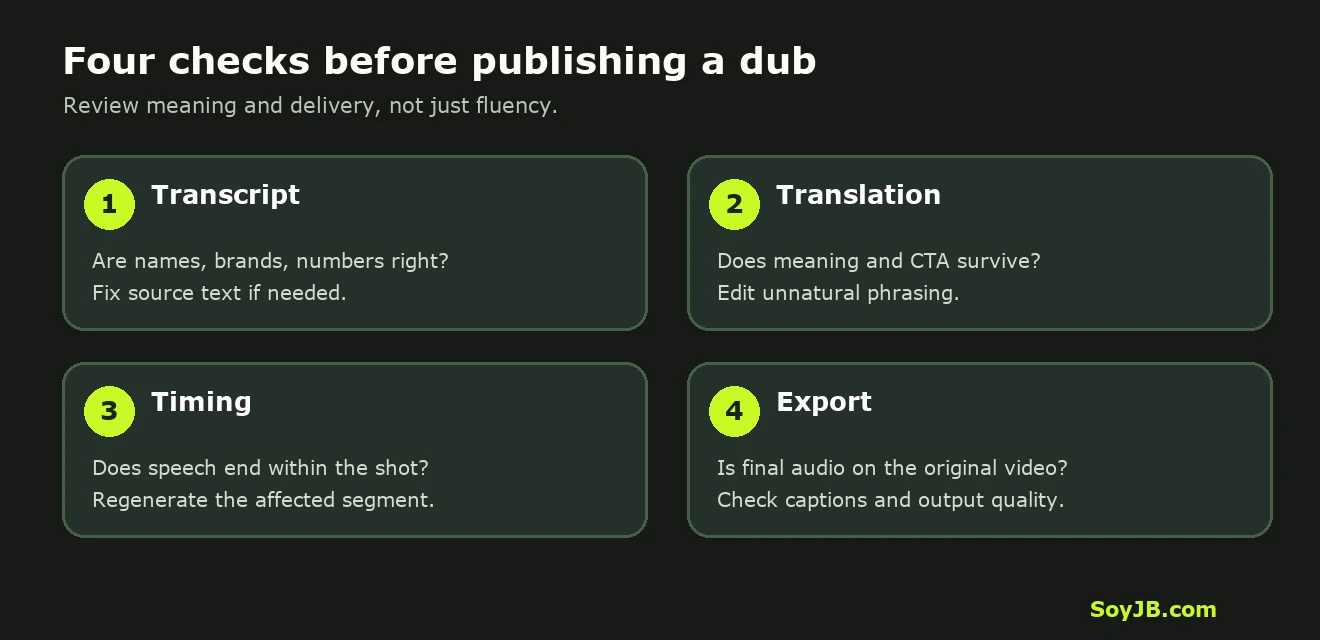
Open the Dubbing v2 editor and compare source transcript, translation, and audio. The product guide says you can edit text in the UI and regenerate individual segments. Do more than one listen: review the output in four passes.
- Transcript: fix names, acronyms, numbers, and technical terms in the Spanish source. A source error can propagate into translation.
- Meaning: check that the English keeps the benefit and CTA. A phrase like “Mira cómo lo hice” may need “Here's how I did it,” not a stiff literal rendering. Verify any price or availability promise against the original source.
- Timing: listen for speech ending after a shot cut. If a line runs long, shorten its wording and regenerate that segment. ElevenLabs says dubbing aligns audio; Dubbing itself does not provide lip sync.
- On-screen text: voice dubbing does not automatically replace burned-in captions, labels, or links in your video. Edit these in your video project and check mobile readability.
Export audio and preserve video quality
ElevenLabs warns that a downloadable dubbed video is a preview, commonly 1080p, and may not match the original resolution. For production, it recommends downloading the dubbed audio and replacing the track on the original video. Check voice level, music mix, total duration, and whether a sentence begins cleanly. Export a separate version with English captions and keep the Spanish project for later corrections.
Before publishing, ask a fluent English speaker three questions without showing the original: what is explained, what is the concrete step, and what should the viewer do next? If the answers differ from your intent, fix the script or segment. Fluent audio can still communicate the wrong idea. For promotional videos, also check whether price, currency, link, and availability apply to the target market.
Scope and sources
I did not run or pay for a dub in a SoyJB account for this article. Steps and limitations come from the official Dubbing documentation and Dubbing v2 announcement, reviewed November 11, 2026. API transcript editing and segment regeneration have Enterprise plan restrictions; this guide focuses on the web UI. The cover and diagram are SoyJB illustrations, not product screenshots.