
Your agent drafts a discount offer for a customer. It looks plausible, but automatic sending could promise the wrong price or ship a version no one reviewed. For this task, useful automation pauses: the agent prepares, an authorized person decides, and only then does the system send. Vercel's Chat SDK and Workflow SDK guide documents a wait that survives deployment and restarts. This is an existing capability, not a November 8 launch.
Define the decision before wiring buttons
Imagine an offer for order 1842: 10% off for one week. An agent can look up facts, draft the text, and summarize its reasoning. It should not receive a “send” tool before approval. The review card should show the recipient, exact message, price, expiration, and link to the order record. If a required fact is missing, the result is a draft awaiting information, not an offer ready to deliver.
Specify four visible outcomes: approved, denied, timed out, and changes requested. Approval of one version does not authorize another. If the agent edits a sentence after review, the old approval must stop applying. This separation matters more than the visual styling of the button.
How the durable pause works
Vercel's guide marks a function with "use workflow". createWebhook() gives it a resume URL; Chat SDK posts a card with buttons pointing to that URL. When a person clicks, await webhook finishes waiting so the workflow can inspect the decision. External effects live in durable steps marked "use step", which support retries. You need an existing Chat SDK bot, Workflow SDK, a configured project, and Node.js 24 or later according to the current guide. In an existing bot project, install the workflow package with pnpm add workflow.
For a customer offer, adapt the pattern to draft → show card → wait → verify identity, version, and expiry → send once → close card. Add a timeout such as 24 hours. If nobody answers, mark the offer expired and send nothing. Vercel's example races the webhook against a durable sleep("24h"). Finalize the card without its buttons so an old click cannot be mistaken for a fresh approval.
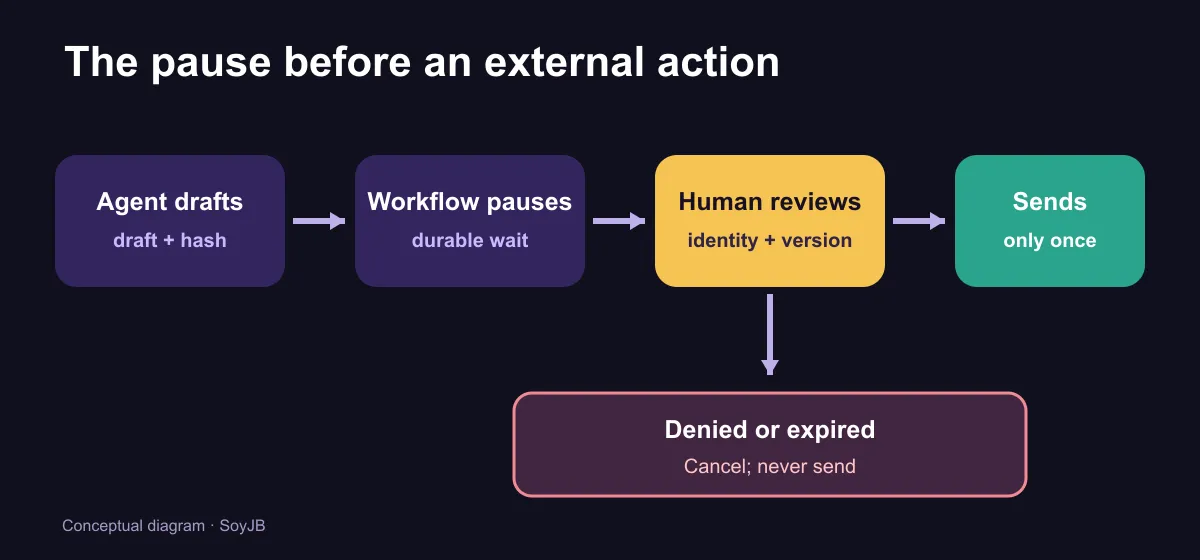
A small gate you can run locally
The file below does not connect to Slack or send email. It tests one important invariant before integration: the approved text must match the text being sent, the actor must be the allowed reviewer, and approval must be unexpired. Save it as approval-gate.mjs and run node approval-gate.mjs. Four assertions cover acceptance, the wrong user, a changed message, and expiration:
import assert from 'node:assert/strict';
import { createHash } from 'node:crypto';

const digest = (text) => createHash('sha256').update(text).digest('hex');

function maySend({ approval, authenticatedUserId, currentDraft, now }) {
  if (approval.state !== 'approved') return false;
  if (authenticatedUserId !== approval.approverId) return false;
  if (now >= approval.expiresAt) return false;
  if (digest(currentDraft) !== approval.draftHash) return false;
  return true;
}

const draft = 'Offer for order 1842: 10% discount, valid this week.';
const approval = {
  state: 'approved',
  approverId: 'U_REVIEWER',
  expiresAt: Date.parse('2026-11-09T18:00:00Z'),
  draftHash: digest(draft),
};
const now = Date.parse('2026-11-08T18:00:00Z');

assert.equal(maySend({ approval, authenticatedUserId: 'U_REVIEWER', currentDraft: draft, now }), true);
assert.equal(maySend({ approval, authenticatedUserId: 'U_OTHER', currentDraft: draft, now }), false);
assert.equal(maySend({ approval, authenticatedUserId: 'U_REVIEWER', currentDraft: draft + ' Extra term.', now }), false);
assert.equal(maySend({ approval, authenticatedUserId: 'U_REVIEWER', currentDraft: draft, now: approval.expiresAt }), false);
console.log('Four approval gate checks passed.');
We ran this local check, but it is not a replacement for server-side identity verification. In production, authenticatedUserId must come from an authenticated route that verifies the approver. Never trust a name or ID merely because it appears in a webhook body. Vercel warns that a createWebhook() URL is protected by its token: anyone who intercepts it may try to resume the workflow. For sensitive effects, Vercel recommends createHook() and your own authenticated route calling resumeHook(). The local function is not enough to prevent double sends either: your external send step needs an idempotency key tied to the order and approved version.
Test failure paths before contacting customers
Run the first version with fake order data and a test inbox. Approve and check exactly one delivery of the exact reviewed text. Deny and check zero deliveries. Let it expire and inspect the final state. Change one word after approval and require a new decision. Force a retry of the send step to test idempotency. If any of these fail, do not connect the tool to your live customer channel yet.
For a simple one-off approval that does not need to survive restarts, a Chat SDK handler may be enough. Workflow SDK becomes useful when a wait lasts hours, must survive deployments, or belongs to a longer chain. The practical decision is to pause external actions whose mistakes cost more than the time it takes to review a card.