You ask Copilot to fix a bug from your phone, then continue the same work in VS Code. The agent runs remotely while your laptop is closed and can keep a snapshot for later. GitHub announced on October 28, 2026 that billing for these cloud sandboxes begins in November. If you are a founder running multiple coding agents, the practical question is which parts of a session draw from your compute allowance and which continue to meter after you stop.
Cloud, local, and Actions are different environments
GitHub's cloud sandbox documentation says a cloud session runs in an isolated Linux environment hosted by GitHub. Cloud is the default for several Copilot surfaces, including github.com and mobile; copilot --cloud explicitly starts one from the CLI. A local session runs on your machine and does not incur a cloud-sandbox charge. An Actions environment remains an option for setups needing custom runners or Windows. You choose the environment when starting a session and cannot switch that session later.
The October announcement says the new cloud experience is available on paid Copilot plans. Eligible cloud compute and memory draw from an included, shared dollar-based compute entitlement that also covers certain Actions runner use. Extra charges depend on your plan, remaining allowance, payment settings, and budgets. A metered minute does not necessarily mean a new out-of-pocket charge if included compute remains.
Work through the official ten-minute example
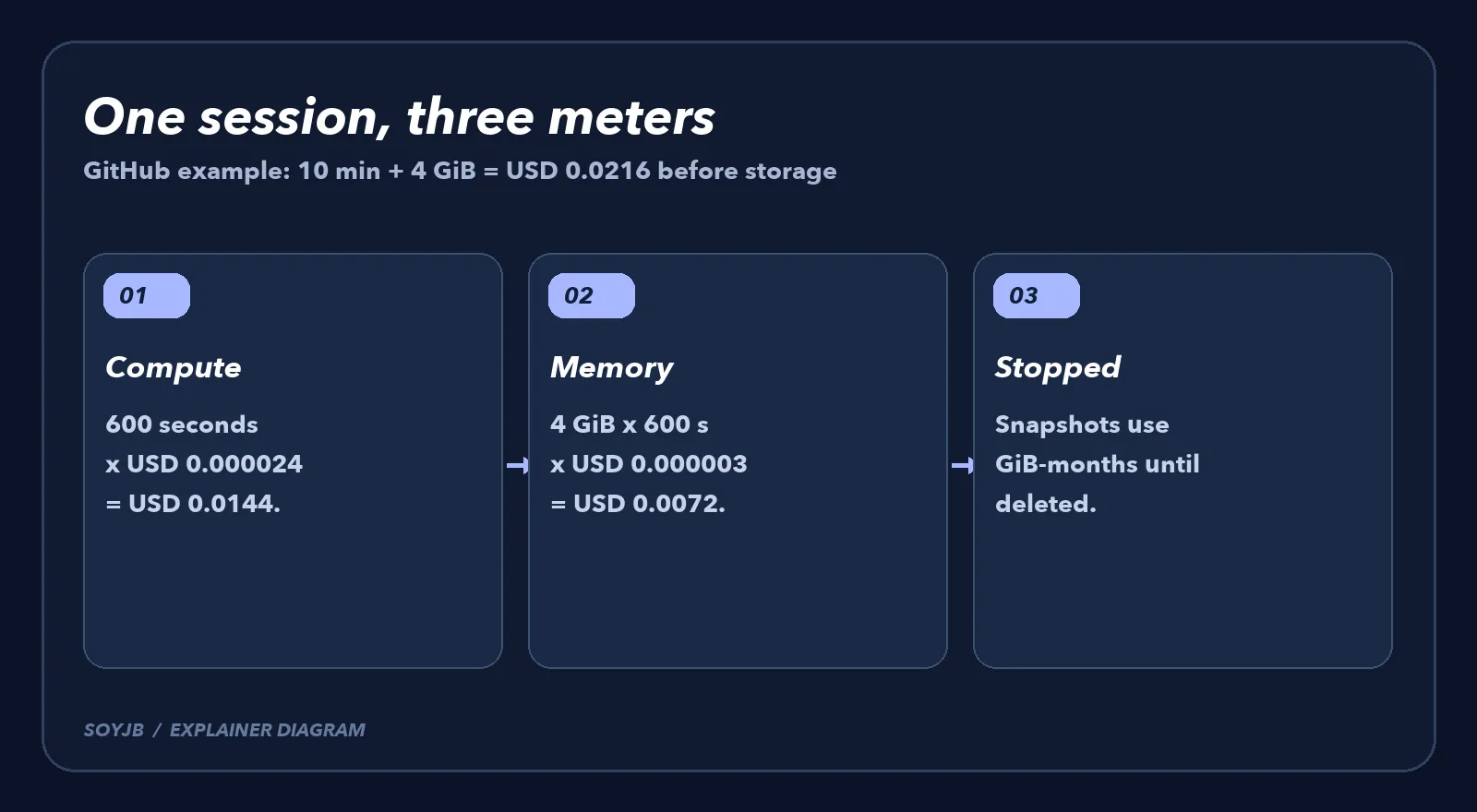
On the GitHub billing page, checked November 3, compute is USD 0.000024 per second, allocated memory is USD 0.000003 per GiB-second, and stopped-session snapshot storage is USD 0.005 per GiB-month. GitHub's example runs for 600 seconds with 4 GiB of allocated memory: USD 0.0144 for compute plus USD 0.0072 for memory, or USD 0.0216 before storage. I checked the arithmetic: 600 × 0.000024 + 4 × 600 × 0.000003 = 0.0216.
Memory is metered by what the session allocates, not how much your code actually uses. When the sandbox stops, compute and memory metering stop, but its snapshot is stored and metered until deletion. Snapshot size and retention change the final total. The ten-minute figure is a worked example, not a flat fee for every agent task.
A measured rollout for a small team
- Identify the billable owner. GitHub assigns repository sessions to the repository owner's account. For a session without a repository, the chosen account is billed; if none is chosen, the personal account is used. This matters when you work across personal and company projects.
- Run one bounded task. Record start and stop time, allocated memory, and whether a snapshot remains. Compare the estimate with GitHub usage and your remaining included compute before running many tasks in parallel.
- Set the right budget. GitHub offers product-level and SKU-level cloud-sandbox budgets. If you need a hard stop, enable Stop usage when budget limit is reached. A Bundled AI credits budget does not cover these sandbox meters.
- Choose the environment deliberately. A short task needing local files may fit a local session. Cloud can be useful for parallel work and continuity across devices. Cost is only one factor alongside permissions, data, and test requirements.
I did not start paid sessions in Joseph's GitHub account or inspect its monthly allowance. The rates and worked example come from GitHub, not a measured invoice. Check the current billing page and your own usage before setting a team budget.